We use cookies to offer you a more personalized and smoother experience. By visiting this website, you agree to our use of cookies. If you prefer not to accept cookies or require more information, please visit our Privacy Policy.

Necessary cookies These cookies are essential for the proper functioning of the website and cannot be turned off.
Analytics cookies These cookies help us understand how visitors use our website.
Marketing cookies These cookies are used to track visitors and display relevant advertisements.
Social media cookies These cookies allow you to share pages and content on social media.
Question: I have added a WiFi module to my system. How do I install the WiFi antennas for the motherboard with flexible integrated I/O Shield?(8/1/2020) Answer: To install the WiFi antennas, please refer to the following steps to remove I/O armor from the motherboard.
Step 1.
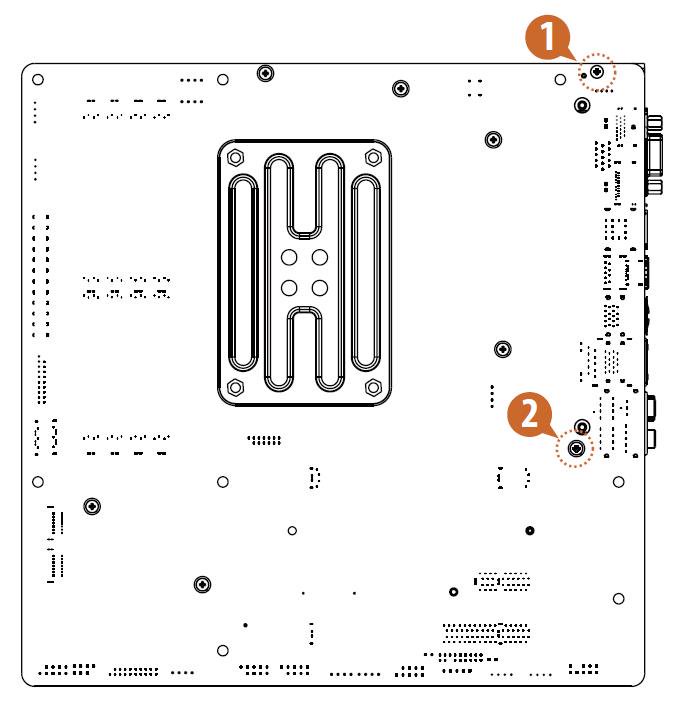
Please remove the two screws from the bottom side of the motherboard before removing the
I/O armor. The positions of the screws are indicated as below.
*The diagrams shown here are for reference only. The screws might be in a different position on
your motherboard
Step 2.
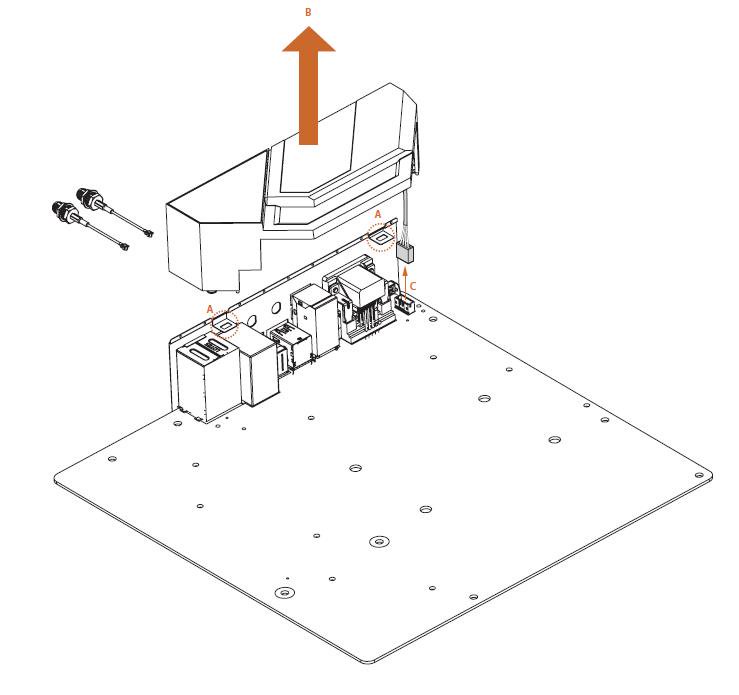
To remove the I/O Armor, slide the I/O Armor outwards until it disengages from the notches (A), and lift it up (B). Then unplug the IO_LED_HEADER1 cable (C).
*The diagrams shown here are for reference only. The headers might be in a different position on
your motherboard