We use cookies to offer you a more personalized and smoother experience. By visiting this website, you agree to our use of cookies. If you prefer not to accept cookies or require more information, please visit our Privacy Policy.

Necessary cookies These cookies are essential for the proper functioning of the website and cannot be turned off.
Analytics cookies These cookies help us understand how visitors use our website.
Marketing cookies These cookies are used to track visitors and display relevant advertisements.
Social media cookies These cookies allow you to share pages and content on social media.
Question: How do I play Dolby ATMOS through a receiver on Z270 Gaming-ITX/ac?(10/1/2017) Answer: Please refer to the following requirements, configurations and setup procedures.
[Requirements]
OS: Windows 10
Receiver / decoder: Onkyo TX-NR 747 or other receiver supporting HDCP 2.2
Player: Pioneer Ultra HD Blu-ray drive
BD Disk: Most 3D / 4K BD disk movie
Playback Software: Power DVD 14 or later version
[Setup]
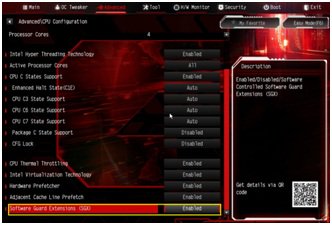
1. When the system boots up, press "F2" to enter UEFI setup screen.
Go to Advanced > CPU Configuration and enable "Software Guard Extensions" in BIOS setting.
Press "F10" to save and exit the BIOS setup screen.
2. Boot into O.S. Install all drivers for the M/B.
Install ME driver ver: 11.6.0.1126 (supports Ultra HD Blu-ray). Download the driver from the following link: http://www.asrock.com/MB/Intel/Fatal1ty%20Z270%20Gaming-ITXac/index.asp#osW1064
3. Go to Control Panel > Hardware and sound > Sound and select "Receiver output”.