We use cookies to offer you a more personalized and smoother experience. By visiting this website, you agree to our use of cookies. If you prefer not to accept cookies or require more information, please visit our Privacy Policy.

Necessary cookies These cookies are essential for the proper functioning of the website and cannot be turned off.
Analytics cookies These cookies help us understand how visitors use our website.
Marketing cookies These cookies are used to track visitors and display relevant advertisements.
Social media cookies These cookies allow you to share pages and content on social media.
Question: How do I install CPUs on socket 2011/ 2011-3 motherboards?(8/1/2015) Answer: Step 1. Open the CPU socket without removing the CPU protection cover: Disengage the levers on both sides by pressing it down and sliding it out of the hook.
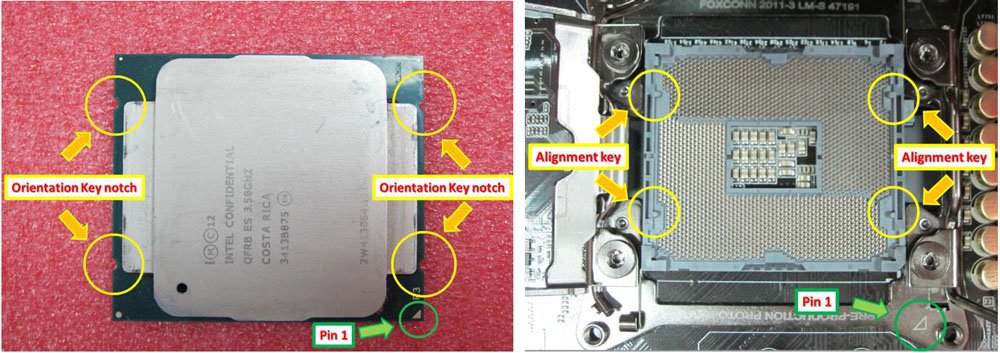
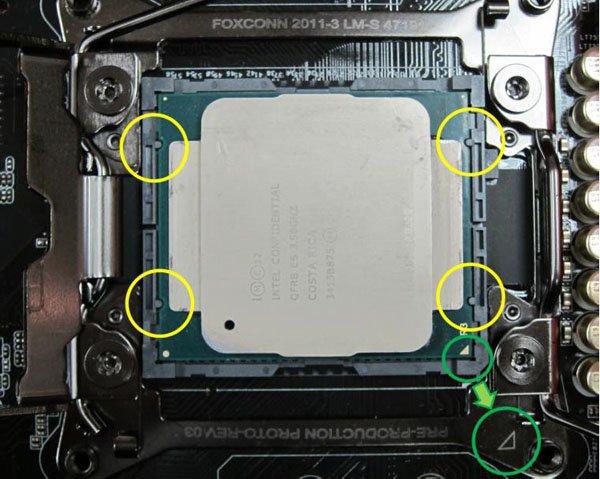
Step 2. Insert the LGA 2011-3 CPU: Make sure that you locate Pin1 and the two orientation key notches to where they belong, and then carefully place the CPU into the socket.
Step 3. Close the socket: Press down the levers on both sides, and secure them under the retention tab. The protection cover will automatically come off by itself.