We use cookies to offer you a more personalized and smoother experience. By visiting this website, you agree to our use of cookies. If you prefer not to accept cookies or require more information, please visit our Privacy Policy.

Necessary cookies These cookies are essential for the proper functioning of the website and cannot be turned off.
Analytics cookies These cookies help us understand how visitors use our website.
Marketing cookies These cookies are used to track visitors and display relevant advertisements.
Social media cookies These cookies allow you to share pages and content on social media.
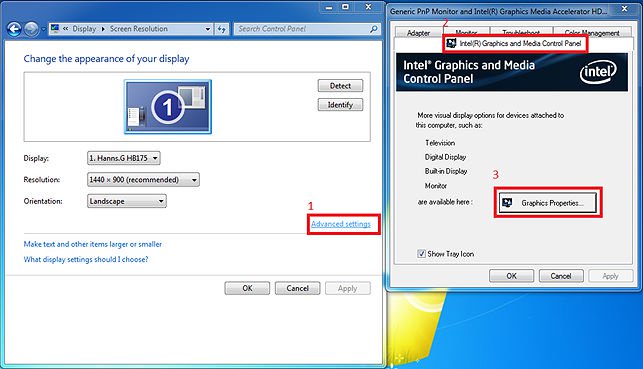
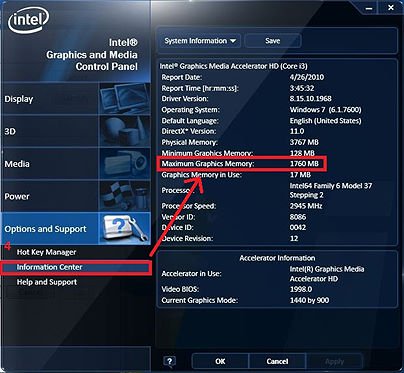
Question: Where could I get the maximum share memory on H55 series motherboards?(7/15/2010) Answer: The shared memory size is dynamically controlled by VGA driver, and the maximum share memory size will be available only when more than 4GB memory is installed under 64-bit OS. Please kindly refer to the following steps to check the maximum graphic share memory.
1.Visit the "Display" option in the control and choose "Advanced setting".
2.Choose ""Intel® Graphic and Media Control Panel.
3.Click the "Graphic Properties.'
4.Visit the "Option and support" and choose "Information Center".
5.Then you could see the information at the right side.