We use cookies to offer you a more personalized and smoother experience. By visiting this website, you agree to our use of cookies. If you prefer not to accept cookies or require more information, please visit our Privacy Policy.

Necessary cookies These cookies are essential for the proper functioning of the website and cannot be turned off.
Analytics cookies These cookies help us understand how visitors use our website.
Marketing cookies These cookies are used to track visitors and display relevant advertisements.
Social media cookies These cookies allow you to share pages and content on social media.
Question: If I use HDMI output, the desktop size can not fully fit the monitor.
How can I do?(8/11/2009) Answer:
If your monitor has "PC mode", please try to adjust monitor to PC mode. If not, please contact your monitor vender for help.
Or you can do some setting on driver.
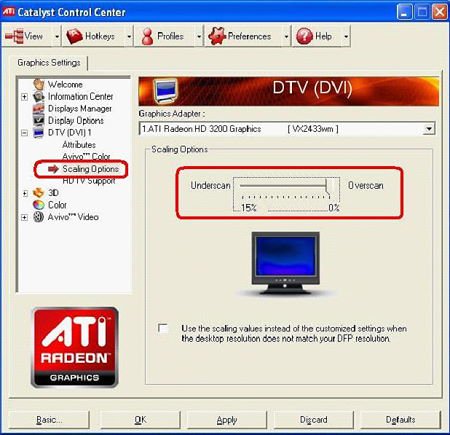
ATI VGA output, please refer setting A.
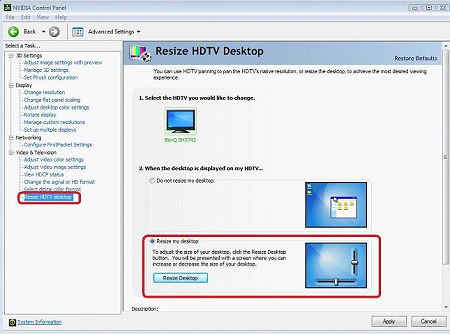
NVIDIA® VGA output, please refer setting B.
A. If you use ATI VGA output, please enter [ATI driver controller] to adjust [Scaling Option]
1. Right check the mouse, and enter ATI driver controller.
2. Find the [Scaling Option] to setting the bar until to fit the size.
B. If you use NVIDIA® VGA output, please enter [NVIDIA® driver controller] to adjust [Resize desktop]
1. Right check the mouse, and enter NVIDIA® driver controller.
2. Find the [Resize desktop] option to setting the bar until to fit the size.