We use cookies to offer you a more personalized and smoother experience. By visiting this website, you agree to our use of cookies. If you prefer not to accept cookies or require more information, please visit our Privacy Policy.

Necessary cookies These cookies are essential for the proper functioning of the website and cannot be turned off.
Analytics cookies These cookies help us understand how visitors use our website.
Marketing cookies These cookies are used to track visitors and display relevant advertisements.
Social media cookies These cookies allow you to share pages and content on social media.
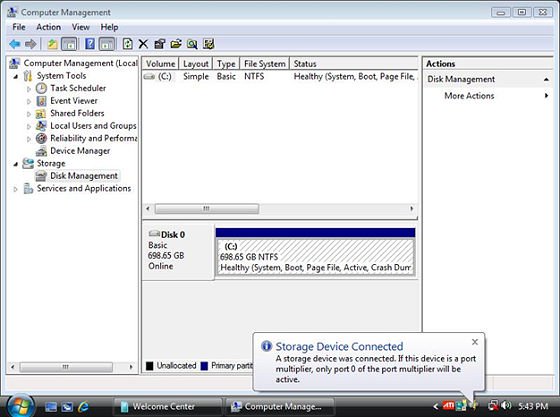
Question: When I plug in an eSATA HDD, it can be recognized in the BIOS. But in the OS, it will show a massage "Storage Device Connected". And I can not use this eSATA HDD, ether. How can I fix it? (3/28/2009) Answer: Please follow below steps to set:
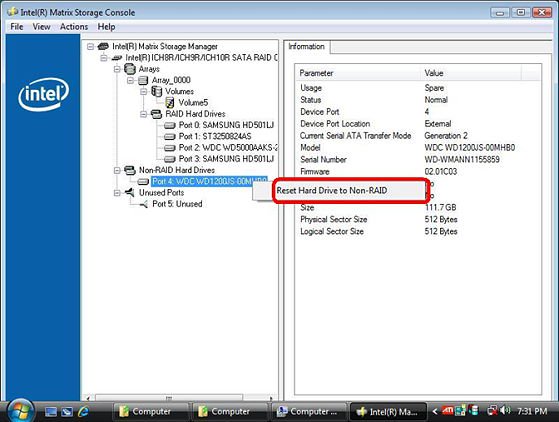
1.Please enter Intel® Matrix Storage Console, and click the mouse right button on eSATA hard device. And press [Reset Hard Drive to Non-RAID].
2.After setting [Reset Hard Drive to Non-RAID], please restart your computer.
3.Enter to Disk Management, it can recognize your eSATA HDD, please crate a New Simple Volume on it.
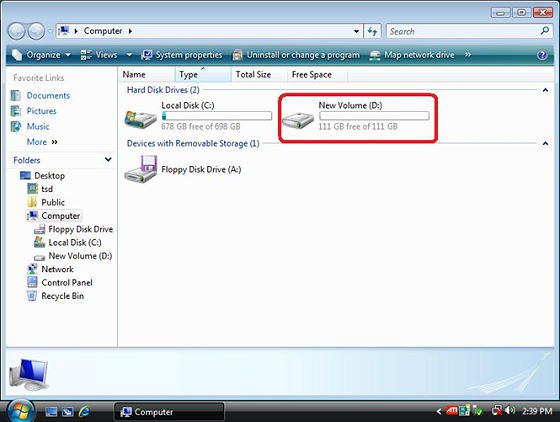
4.After than, the eSATA HDD can be recognized.