We use cookies to offer you a more personalized and smoother experience. By visiting this website, you agree to our use of cookies. If you prefer not to accept cookies or require more information, please visit our Privacy Policy.

Necessary cookies These cookies are essential for the proper functioning of the website and cannot be turned off.
Analytics cookies These cookies help us understand how visitors use our website.
Marketing cookies These cookies are used to track visitors and display relevant advertisements.
Social media cookies These cookies allow you to share pages and content on social media.
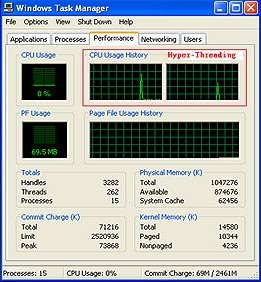
Question: I use a HT CPU and an ASRock motherboard which supports Hyper-Threading. How do I know if my system is working under Hyper-Threading?(3/21/2005) Answer: Please right click on the Taskbar and choose the Task Manager. In "performance" option, if you see two figures of CPU Usage History, it means that the system is working under Hyper-Threading. (Please refer to the following picture).
Hyper-Threading
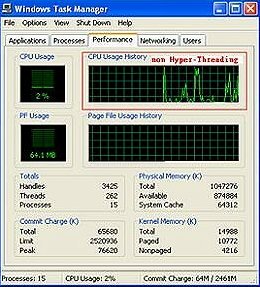
If you see only one figure of CPU Usage History, it means that the system is not working under Hyper-Threading. (Please refer to the following picture).
Non Hyper-Threading