Motherboards button
Moederbord Series
Graphics Card button
Grafische kaart Series
Monitors button
Monitor Gamer
Power Supply button
Power Supply
Mini PC button
Mini PC Series
AIO Liquid Coolers button
AIO Liquid Coolers
Industrial PC button
Industriële PC Series
Server/WS button
Server/Werkstation Series
Loading

We use cookies to offer you a more personalized and smoother experience.
By visiting this website, you agree to our use of cookies. If you prefer not to accept cookies or require more information, please visit our Privacy Policy.
FAQ

Als u precies weet waarover w vraag gaat dan kunt u een van deze categorieën kiezen. Categorieën:

Resultaten:
Q (Q&A-127|418): If I have a TPM module on the motherboard and want to update the BIOS, what should I do?(12/1/2016)
A:If you have a TPM module on the motherboard and want to update BIOS, please follow the steps below to disable TPM function before flashing BIOS.
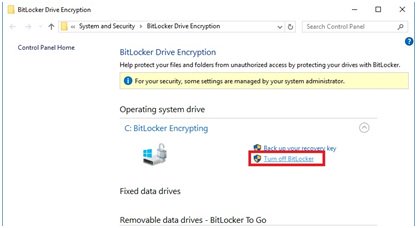
In OS:
1. Right-click the Menu button.
2. Left-click > Control Panel > System and Security > BitLocker Drive Encryption
3. Turn off BitLocker

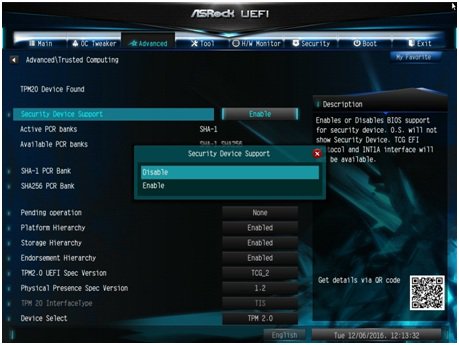
In BIOS
1. BIOS setup > Advanced > Trusted Computing
2. Security Device Support to "Disable”

After flashing the BIOS, please enable the function.







