A:Due to the known TPM attestation issue on the AM4 platform, errors may occur when launching games that require anti cheat enforcement if the system's TPM firmware version is outdated.
TPM Attestation Failure on AMD Platforms with ASP fTPM
How do I check the current TPM version?
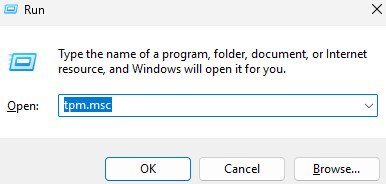
1. Press Win key + R in Windows OS
2. Type tpm.msc and press Enter
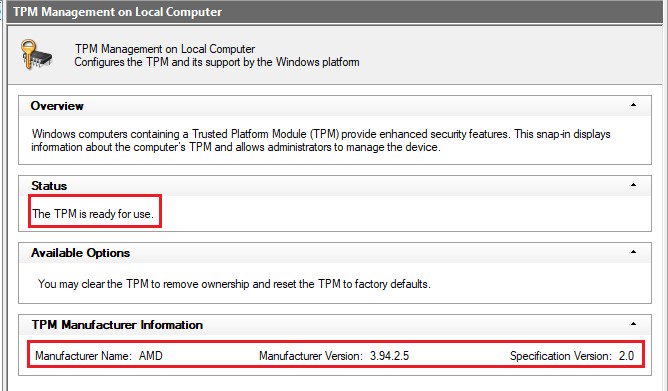
3. You can check the TPM status and the TPM firmware version in the window.
On AM4 platform, the fTPM version should be 3.*.2.* to ensure proper operation of the games.
ASRock has released BIOS including updated fTPM to address this issue.
Please visit ASRock website and search the model name of the motherboard you are using to obtain the updated BIOS file from support page.
https://www.asrock.com/index.asp
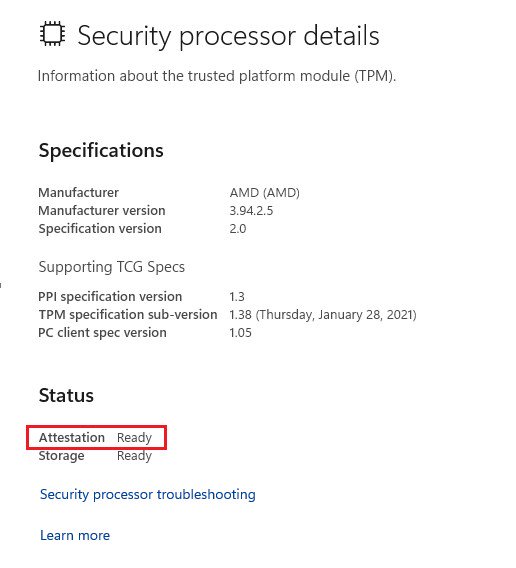
Please ensure that TPM attestation shows as Ready in the Windows Security processor details page after performing the BIOS update.
If it shows Not Ready, please ensure that the system has a proper network connection, then reboot the system and recheck the status.
1. Press
Win key + R in Windows OS
2. Type
windowsdefender://securityprocessor and press OK
 Based on AMD's official response, the updated fTPM is only available for following CPU series. If the CPU model you are using is not included in the supported lineup, it will not be able to meet the TPM attestation requisite of the games that require anti-cheat.
Raven2/ Picasso/ Matisse/ Renoir/ Cezanne/ Vermeer
Based on AMD's official response, the updated fTPM is only available for following CPU series. If the CPU model you are using is not included in the supported lineup, it will not be able to meet the TPM attestation requisite of the games that require anti-cheat.
Raven2/ Picasso/ Matisse/ Renoir/ Cezanne/ Vermeer
#CoD#Call of Duty#fTPM#firmware TPM#anti-cheat#TPM Attestation#TPMB
 Menu
Menu