Motherboards button
Serie schede madri
Graphics Card button
Serie Scheda grafica
Monitors button
Monitor Gamer
Power Supply button
Power Supply
Mini PC button
Serie Mini PC
AIO Liquid Coolers button
AIO Liquid Coolers
Industrial PC button
Serie PC industriali
Server/WS button
Serie server/workstation
Loading

Utilizziamo i cookie per offrirti un'esperienza più personalizzata e fluida.
Visitando questo sito web, acconsenti all’utilizzo dei cookie da parte nostra. Se preferisci non accettare i cookie o hai bisogno di maggiori informazioni, consulta la nostra Informativa sulla privacy.

FAQ

Se siete pienamente consapevoli della categoria della vostra domanda, si può scegliere una delle categorie qui sotto per le domande più frequenti. Catalogo:

Risultati:
Q (255): Why I cannot hear audio playback under Windows® XP when I connect HDMI cable with ION330?(9/3/2009)
A:Some suggestions as below may solve the issue,

1. Please re-install your Windows® XP and install required driver in such order :
a. HD Audio Driver and Application(VIA® HD Audio driver)
b. Onboard HDMI HD driver (NVIDIA® HDMI driver)
c. All in 1 driver.

2. Refering to the attached picture, please install a display driver in support CD -> Others -> Display -> XP32_185.66 -> Setup.exe
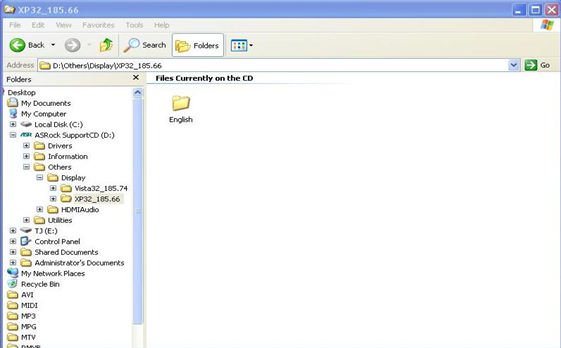

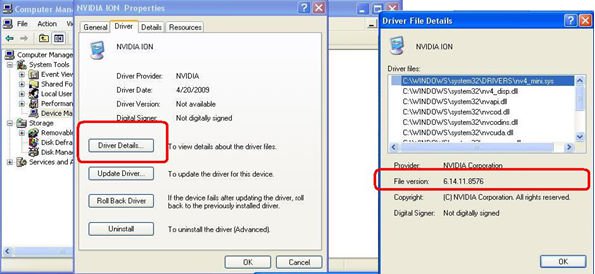
3. Please check your VGA driver version has been update to 6.14.11.8576 by device management.

4. Since when ever you plugged the rear speaker to ION330, the sound playback would AUTOMATICALLY set to "HD Audio Rear Output", therefore, during the test, please ONLY connect HDMI to the TV, and make sure the sound playback is set to "NVIDIA® HD Audio"







