Motherboards button
Serie schede madri
Graphics Card button
Serie Scheda grafica
Monitors button
Monitor Gamer
Power Supply button
Power Supply
Mini PC button
Serie Mini PC
AIO Liquid Coolers button
AIO Liquid Coolers
Industrial PC button
Serie PC industriali
Server/WS button
Serie server/workstation
Loading

Utilizziamo i cookie per offrirti un'esperienza più personalizzata e fluida.
Visitando questo sito web, acconsenti all’utilizzo dei cookie da parte nostra. Se preferisci non accettare i cookie o hai bisogno di maggiori informazioni, consulta la nostra Informativa sulla privacy.

FAQ

Se siete pienamente consapevoli della categoria della vostra domanda, si può scegliere una delle categorie qui sotto per le domande più frequenti. Catalogo:

Risultati:
Q (249): I installed Vista x64 sp1 on ALiveNF6G-GLAN, but I cannot shut down my system after I execute the "sysprep" program under operating system. What do I do?(6/25/2009)
A:Due to the NVIDIA® chipset specification, the HDD driver is requirement, please install the HDD driver during the installation of operating system.

Please refer to below steps to install the HDD driver:
1. Please download the driver and save the driver to floppy disk, USB driver, CD or DVD.
HDD driver download link : https://www.asrock.com/mb/download.asp?Model=NF6-GLAN&s=AM2

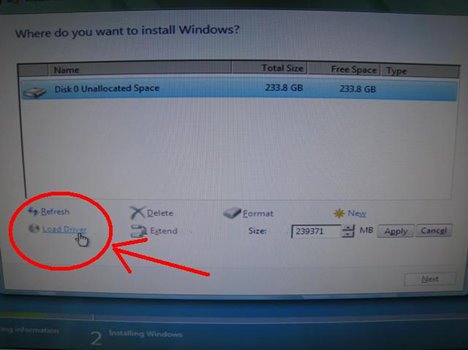
2. Click "Load driver" icon at the "Where do you want to install Windows?" stage.

3. Then click "OK"
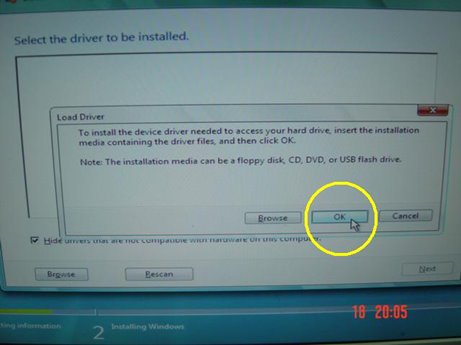

4. Check the icon and click "Brows"
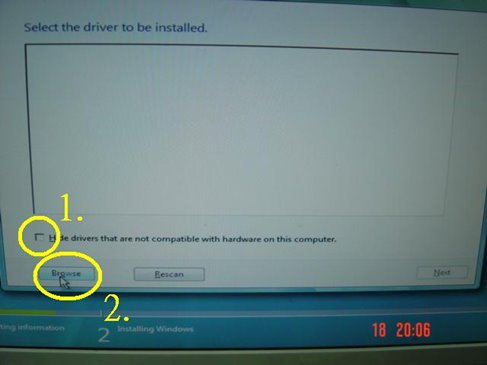

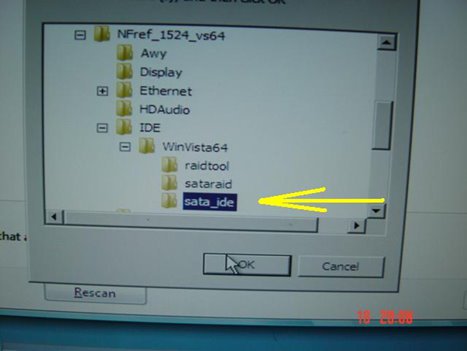
5. Then choose the driver from the source which you saved.
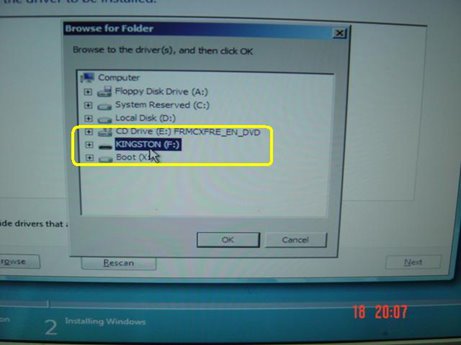


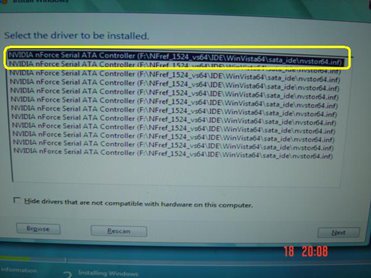
6. Select the HDD driver and click "Next" to install the driver.