Q (
228):
My motherboard is ALiveNF6P-VSTA / ALiveNF6G-VSTA (MCP61 chipset). I'm encountering some problems with SATA HDD when installing the drivers of the motherboard under Windows
® Vista™. What should I do?(4/28/2008)
A:Please refer to below suggestions.
If you want to install the Windows
® Vista™ with non-RAID mode:
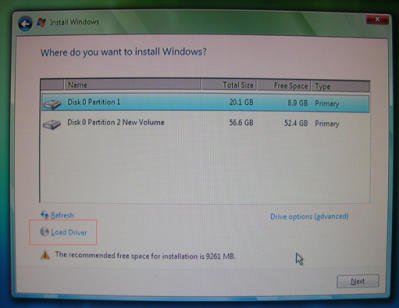
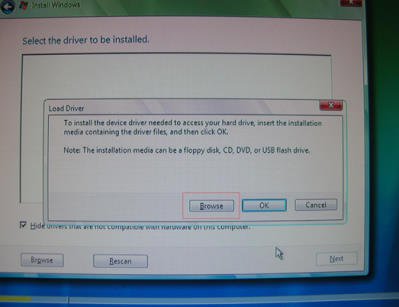
Install the SATA driver v998 from support CD during the installation of Windows
® Vista™.
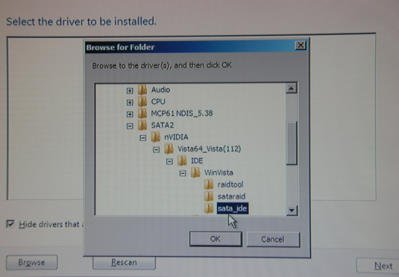
The driver path in support CD is
Support CD/Drivers/ SATA2/ nVIDIA/ Vista64_Vista(112)/ IDE/ WinVista/ sata_ide.
Step1:
Step2:
Step3:
You can also download the SATA driver v998 from ASRock website and save it to a floppy diskette, USB flash drive or CD/DVD disk.
Then install the SATA driver v998 from floppy diskette, USB flash drive or CD/DVD disk during the installation of Windows
® Vista™.
ALiveNF6P-VSTA: https://www.asrock.com/mb/download.asp?Model=ALiveNF6P-VSTA
ALiveNF6G-VSTA: https://www.asrock.com/mb/download.asp?Model=ALiveNF6G-VSTA
ALiveNF6G-GLAN: https://www.asrock.com/mb/download.asp?Model=ALiveNF6G-GLAN
ALiveNF6G-DVI: https://www.asrock.com/mb/download.asp?Model=ALiveNF6G-DVI
AM2NF6G-VSTA: https://www.asrock.com/mb/download.asp?Model=AM2NF6G-VSTA
If you want to install the Windows
® Vista™ with RAID mode:
Please refer to the NVIDIA RAID installation guide.
https://download.asrock.com/Manual/raid/ALiveNF6P-VSTA/English.pdf
 Menu
Menu







