ASRock
 Menü Menü
Wir verwenden Cookies, um Ihnen ein individuelles und reibungsloses Erlebnis zu bieten.
Wenn Sie diese Website besuchen, stimmen Sie unserer Verwendung von Cookies zu. Wenn Sie es vorziehen, keine Cookies zu akzeptieren oder weitere Informationen benötigen, lesen Sie bitte unsere Datenschutzerklärung.
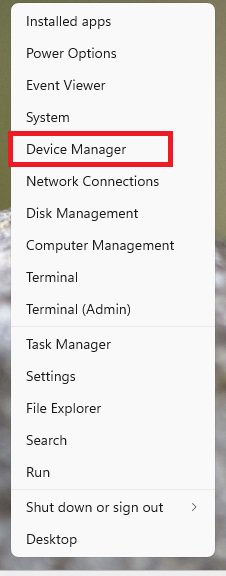
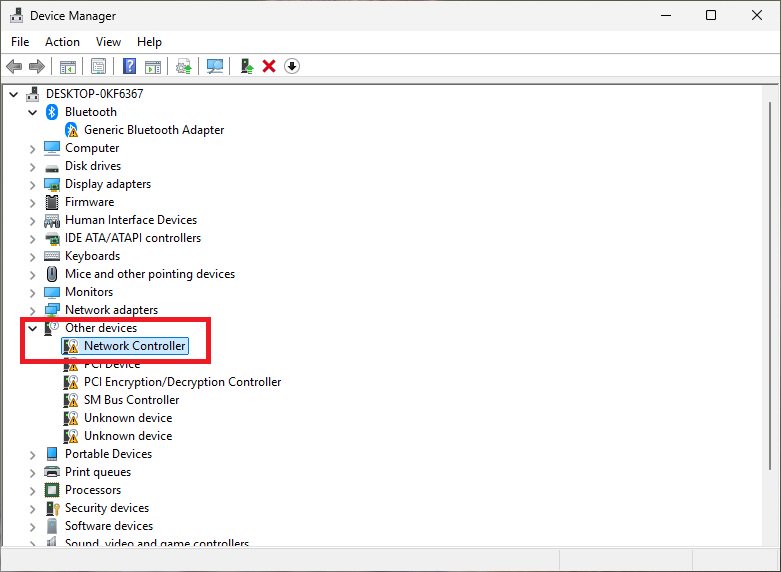
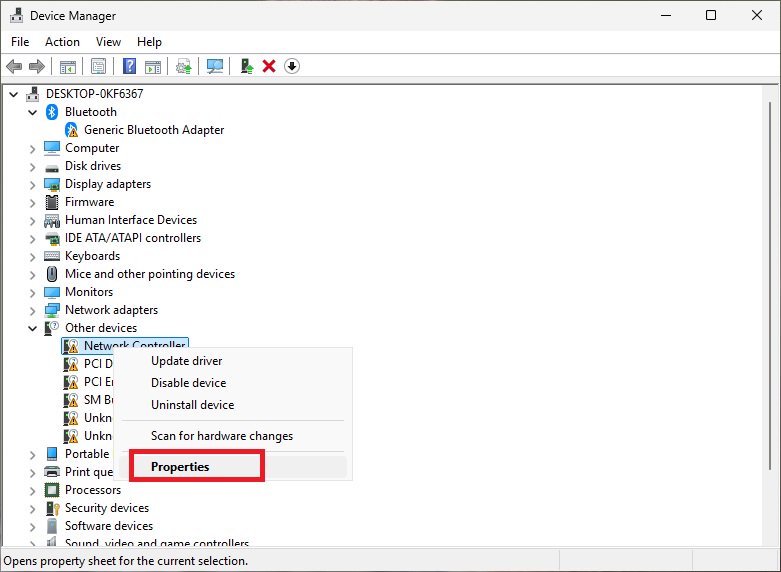
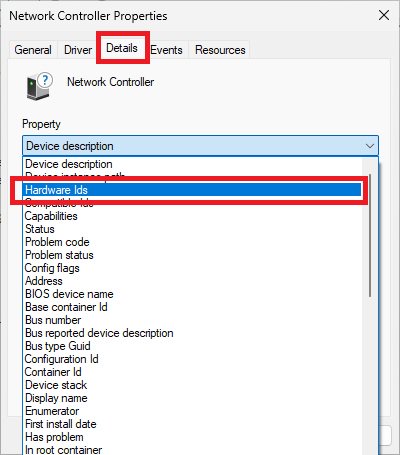
AMD RZ717 (Mediatek) | PCI\VEN_14C3&DEV_0717 |
PCI\VEN_14C3&DEV_0738 | |
PCI\VEN_14C3&DEV_6639 | |
PCI\VEN_14C3&DEV_7925 | |
PCI\VEN_14C3&DEV_7927 | |
AMD RZ616 (Mediatek) | PCI\VEN_14C3&DEV_0608 |
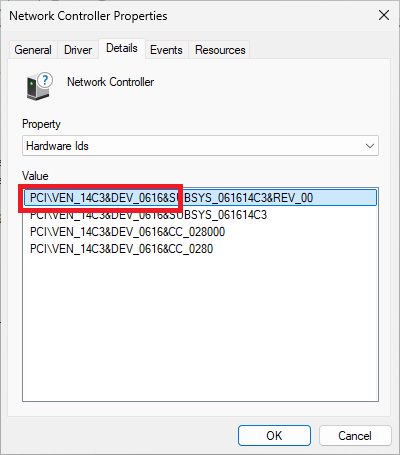
PCI\VEN_14C3&DEV_0616 | |
PCI\VEN_14C3&DEV_7902 | |
PCI\VEN_14C3&DEV_7920 | |
PCI\VEN_14C3&DEV_7922 | |
PCI\VEN_14C3&DEV_7961 | |
Azurewave AW-CB515 | PCI\VEN_10EC&DEV_B822 |
PCI\VEN_10EC&DEV_C822 | |
PCI\VEN_10EC&DEV_C82F | |
PCI\VEN_10EC&DEV_B821 | |
PCI\VEN_10EC&DEV_C821 | |
PCI\VEN_10EC&DEV_C82B | |
PCI\VEN_10EC&DEV_D723 | |
Azurewave AW-XB611 | PCI\VEN_10EC&DEV_885D |
PCI\VEN_10EC&DEV_A85D | |
PCI\VEN_10EC&DEV_B520 | |
PCI\VEN_10EC&DEV_B851 | |
Azurewave AW-EB601 | PCI\VEN_10EC&DEV_8922 |
PCI\VEN_10EC&DEV_A922 | |
Azurewave AW-XB560 | PCI\VEN_10EC&DEV_C852&SUBSYS_C85210EC |
PCI\VEN_10EC&DEV_C852&SUBSYS_585217AA | |
PCI\VEN_10EC&DEV_C852&SUBSYS_88E5103C | |
PCI\VEN_10EC&DEV_C852&SUBSYS_C88510EC | |
PCI\VEN_10EC&DEV_C852&SUBSYS_C88610EC | |
PCI\VEN_10EC&DEV_C852&SUBSYS_C88710EC | |
PCI\VEN_10EC&DEV_C852&SUBSYS_C81211AD | |
PCI\VEN_10EC&DEV_C852&SUBSYS_56011A3B | |
PCI\VEN_10EC&DEV_C852&SUBSYS_56021A3B | |
PCI\VEN_10EC&DEV_C852&SUBSYS_E110105B | |
PCI\VEN_10EC&DEV_C852&SUBSYS_56031A3B | |
PCI\VEN_10EC&DEV_C852&SUBSYS_C80110EC | |
PCI\VEN_10EC&DEV_C852&SUBSYS_C80210EC | |
PCI\VEN_10EC&DEV_C852&SUBSYS_00B51E26 | |
PCI\VEN_10EC&DEV_C852&SUBSYS_C80310EC | |
PCI\VEN_10EC&DEV_C852&SUBSYS_C3261D31 | |
PCI\VEN_10EC&DEV_C852&SUBSYS_56001A3B | |
PCI\VEN_10EC&DEV_C852&SUBSYS_54001A3B |







