Motherboards button
Mainboard
Graphics Card button
Grafikkarte
Monitors button
Gaming-Monitor
Power Supply button
Power Supply
Mini PC button
Mini-PC
AIO Liquid Coolers button
AIO Liquid Coolers
Industrial PC button
Industrie-PC
Server/WS button
Server/Workstation
Loading

Wir verwenden Cookies, um Ihnen ein individuelles und reibungsloses Erlebnis zu bieten.
Wenn Sie diese Website besuchen, stimmen Sie unserer Verwendung von Cookies zu. Wenn Sie es vorziehen, keine Cookies zu akzeptieren oder weitere Informationen benötigen, lesen Sie bitte unsere Datenschutzerklärung.

FAQ

Fallls Sie wissen, in welche Kategorie Ihre Frage gehört, können Sie hier die Kategorie der häufig gestellten Fragen auswählen. Katalog:

Ergebnisse:
Q (Q&A-164|506): How do I enable C.A.M. (Clever Access Memory / Resizable BAR) on H510 Pro BTC+?(10/27/2021)
A:Please follow the steps below to enable C.A.M. (Clever Access Memory) on H510 Pro BTC+.

Step 1.
Download BIOS 1.40 or later version from ASRock website and update the BIOS via Instant Flash.
https://www.asrock.com/MB/Intel/H510%20Pro%20BTC+/index.asp#BIOS

Step 2.
The C.A.M. (Clever Access Memory) option is supported when integrated graphics are disabled.
By default integrated graphics will be disabled when a PCIe graphics card is detected.
Please make sure the monitor is connected to the graphic card.

Step 3.
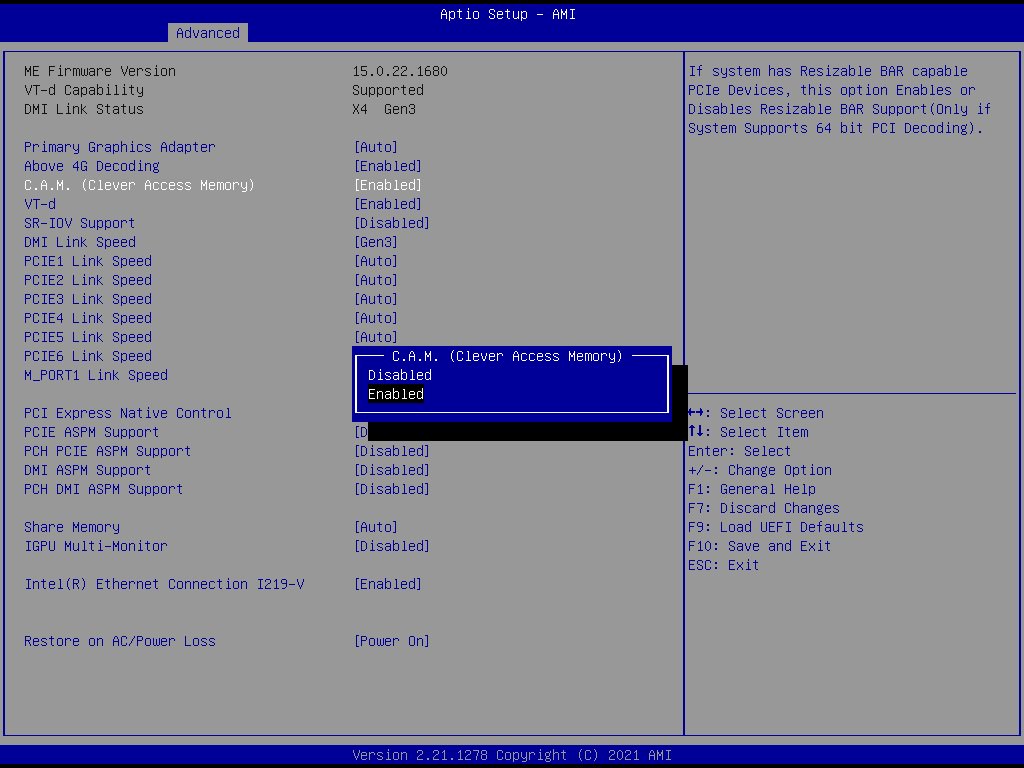
Please go to BIOS\Advanced\Chipset Configuration and enable "C.A.M. (Clever Access Memory)”.
How do I enable C.A.M. (Clever Access Memory / Resizable BAR) on H510 Pro BTC+?

Step 4.
Press F10 to save the setting and restart.






