Q (
Q&A-74|
251):
With ION330, Under Windows
® XP, I can not wake up system from S3 and S4 by USB keyboard mouse, why?(8/11/2009)
A:Please refer to the steps as below to solve the issue.
1.Please download a registry from the link as below,
https://download.asrock.com/Drivers/others/NVUSBS3.zip
2.Referring to the picture, please double click on the file NVUSBS3, and click YES.

After the registry is complete, a window may shows up, please press OK and RESTART your computer.
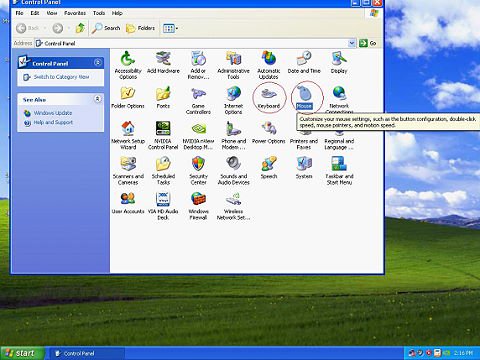
3.Referring to the picture, double click on Keyboard and Mouse in START -> Control Panel.
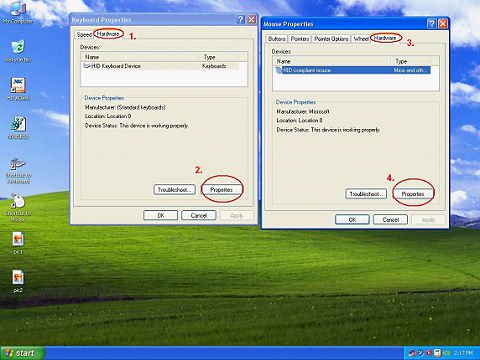
4.Referring to the picture, move to Hardware tags as 1. and 3., click on Properties as 2. and 4.
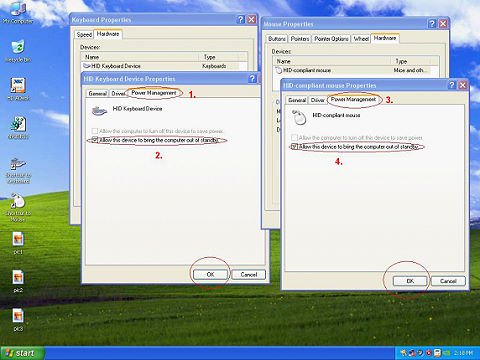
5.Referring to the picture, move to Power Management tag as 1. and 3.
Check Allow this device to bring the computer out of standby in BOTH Keyboard and Mouse windows, as 2. and 4.
6.Now it's available for you to bring your computer from S3 and S4 with your USB keyboard and mouse.
 Menü
Menü






