We use cookies to offer you a more personalized and smoother experience. By visiting this website, you agree to our use of cookies. If you prefer not to accept cookies or require more information, please visit our Privacy Policy.

Necessary cookies These cookies are essential for the proper functioning of the website and cannot be turned off.
Analytics cookies These cookies help us understand how visitors use our website.
Marketing cookies These cookies are used to track visitors and display relevant advertisements.
Social media cookies These cookies allow you to share pages and content on social media.
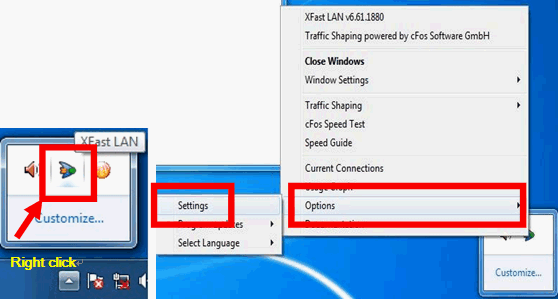
Question: How do I set ASRock XFast LAN works with Teaming function?(1/1/2012) Answer: Please follow the setup steps as below:
Step 1. Please remove all LAN cable from your system.
Step 2. After finish the procedure of OS installation, please insert the support CD and install all system drivers and XFast LAN
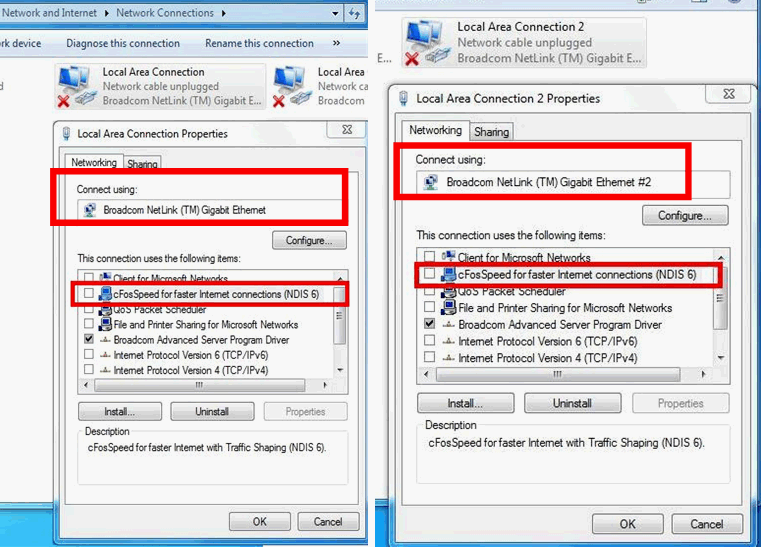
Step 7. Please enter Network Connections and cancel the selection of [cFos Speed for faster Internet connections (NDIS 6)] for Local Area Connection and Local Area Connection 2.
Step 8. Restart system once and connect both LAN cables back to system.