We use cookies to offer you a more personalized and smoother experience. By visiting this website, you agree to our use of cookies. If you prefer not to accept cookies or require more information, please visit our Privacy Policy.

Necessary cookies These cookies are essential for the proper functioning of the website and cannot be turned off.
Analytics cookies These cookies help us understand how visitors use our website.
Marketing cookies These cookies are used to track visitors and display relevant advertisements.
Social media cookies These cookies allow you to share pages and content on social media.
Question: How can I enable the 4K HDR video on Netflix with AMD Raven Ridge or Picasso CPU? (11/1/2019) Answer: To enable the 4K HDR under Netflix, please follow the steps below:
System Requirements:
Hardware:
- HDR certified monitors
- Dual channel memory
- Picasso or Raven Ridge CPU, which supports HDCP2.2.
- AMD motherboards with DP1.2/HDMI2.0 or higher
Software:
- Win10
- All in One Driver 19.10.28 or later version
- Internet
- Netflix Application
- HEVC Video Extension Application
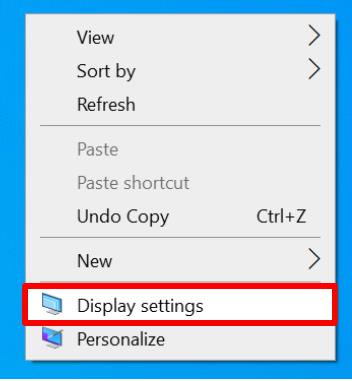
Step 2. Right-click Desktop and select Display settings.
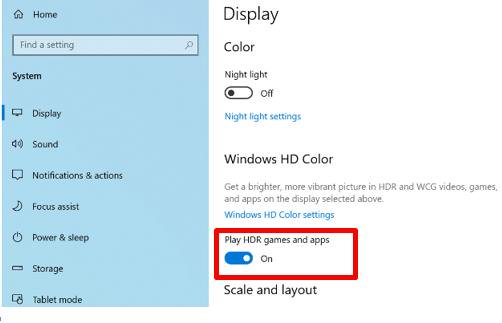
Step 3. Turn on the Play HDR Games and apps.
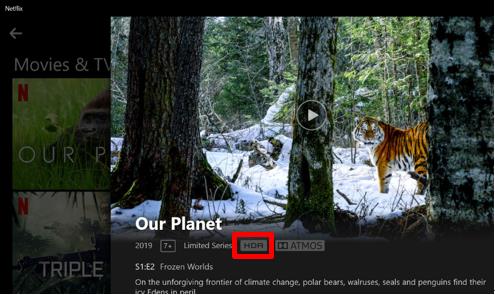
Step 4. Open the Netflix application and when the word HDR is shown as the following picture, it means that HDR video is ready to be played on Netflix.