Motherboards button
Seria de placi de baza
Graphics Card button
Placă grafică
Monitors button
Monitor Gamer
Power Supply button
Power Supply
Mini PC button
Seria mini PC
AIO Liquid Coolers button
AIO Liquid Coolers
Industrial PC button
Seria PC industrial
Server/WS button
Seriile Server/Workstation
Loading

Folosim cookie-uri pentru a vă oferi o experiență mai personalizată și de calitate mai bună.
Vizitând acest site web, sunteți de acord cu utilizarea de cookie-uri de către site-ul nostru. Dacă preferați să nu acceptați cookie-uri sau aveți nevoie de mai multe informații, vă rugăm să vizitați Politica noastră de confidențialitate.

FAQ

Dacă ştii cu exactitate în ce categorie se încadrează întrebările tale poţi alege una dintre categoriile de mai jos pentru întrebările puse frecvent. Catalog:

Rezultate:
Întrebare (Q&A-192|555): How to replace the CMOS battery(10/12/2026)
Răspuns:For the motherboards with a regular CR2032 battery:

1. Locate the battery on the board.
On some models, it will be under a heatsink.
The motherboard layout drawing in the user manual often shows the location.
2. Push the latch to the side to release the battery.
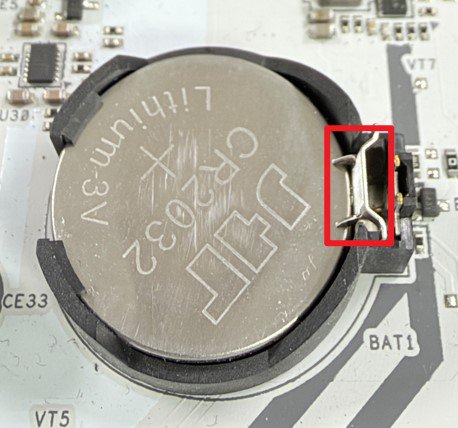
Push the latch to the side to release the battery.

3. Replace the battery with a new one.

For the motherboards with a wired CR2032W battery:

1. Locate the battery on the motherboard.
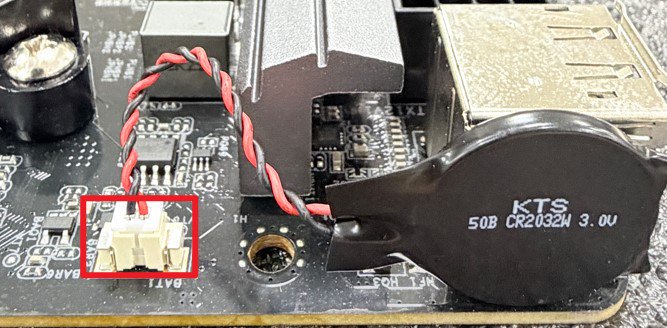
Locate the battery on the motherboard.

2. Disconnect the battery cable from the header.
The battery is usually fixed to some metal part with double-sided foam tape.
Simply pull the battery off of the surface it is stuck to.
3. Replace the battery with a new one.

Note:
For models with a wired CR2032W battery, ASRock typically uses a version with reversed polarity.
Please see below picture for the correct polarity. When searching for a replacement, please check for "reversed polarity” and verify the connector looks identical.
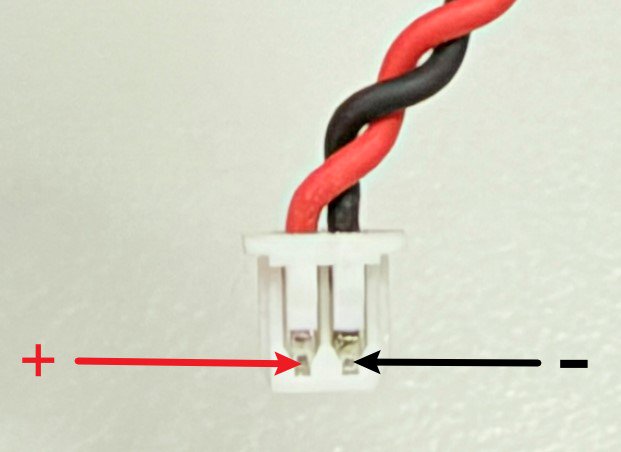

please check for


#CMOS #battery #battery