Motherboards button
Moederbord Series
Graphics Card button
Grafische kaart Series
Monitors button
Monitor Gamer
Power Supply button
Power Supply
Mini PC button
Mini PC Series
AIO Liquid Coolers button
AIO Liquid Coolers
Industrial PC button
Industriële PC Series
Server/WS button
Server/Werkstation Series
Loading

We use cookies to offer you a more personalized and smoother experience.
By visiting this website, you agree to our use of cookies. If you prefer not to accept cookies or require more information, please visit our Privacy Policy.

FAQ

Als u precies weet waarover w vraag gaat dan kunt u een van deze categorieën kiezen. Categorieën:

Resultaten:
Q (Q&A-164|506): How do I enable C.A.M. (Clever Access Memory / Resizable BAR) on H510 Pro BTC+?(10/27/2021)
A:Please follow the steps below to enable C.A.M. (Clever Access Memory) on H510 Pro BTC+.

Step 1.
Download BIOS 1.40 or later version from ASRock website and update the BIOS via Instant Flash.
https://www.asrock.com/MB/Intel/H510%20Pro%20BTC+/index.asp#BIOS

Step 2.
The C.A.M. (Clever Access Memory) option is supported when integrated graphics are disabled.
By default integrated graphics will be disabled when a PCIe graphics card is detected.
Please make sure the monitor is connected to the graphic card.

Step 3.
Please go to BIOS\Advanced\Chipset Configuration and enable "C.A.M. (Clever Access Memory)”.
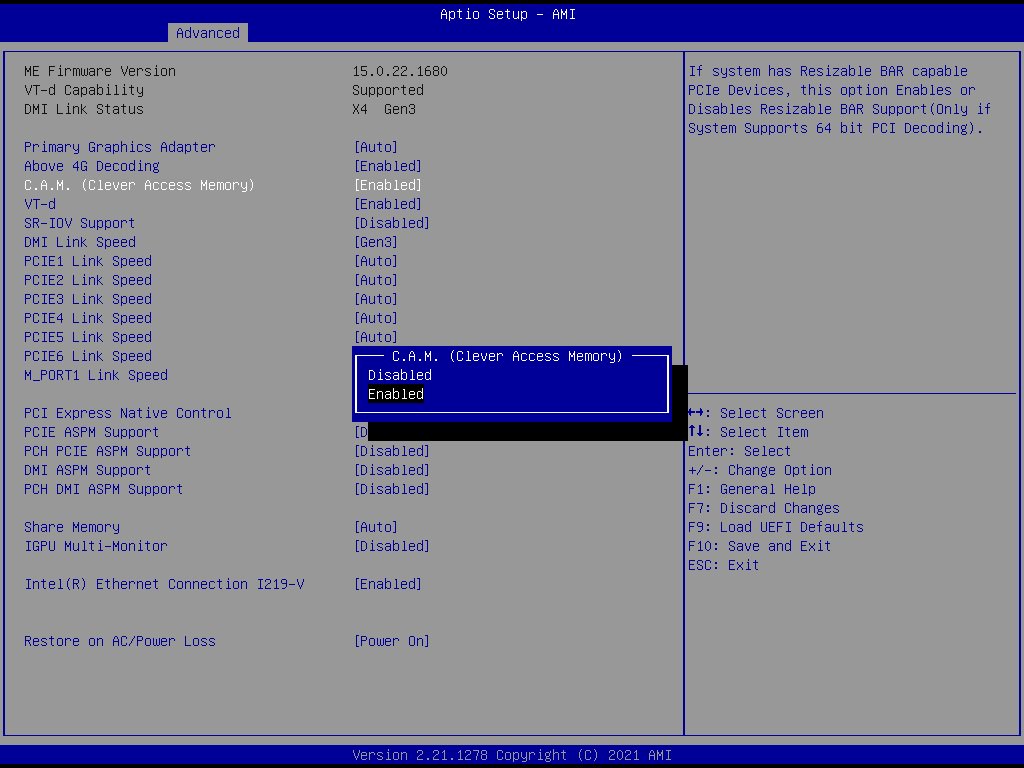
How do I enable C.A.M. (Clever Access Memory / Resizable BAR) on H510 Pro BTC+?

Step 4.
Press F10 to save the setting and restart.







