A:If you'd like to adjust shared memory, please follow the steps below to find and adjust the OC settings.
1. Please press "F2” or "Del” during POST to enter BIOS setup
2. Refer to the following path to adjust the OC setting.
a. Advanced\AMD CBS\NBIO Common Options\GFX Config IGC :Forces
b. Advanced\AMD CBS\NBIO Common Options\UMA Mode : UMA_Spec
c. Advanced\AMD CBS\NBIO Common Options\UMA Frame Buffer Size: Choose a prefer size
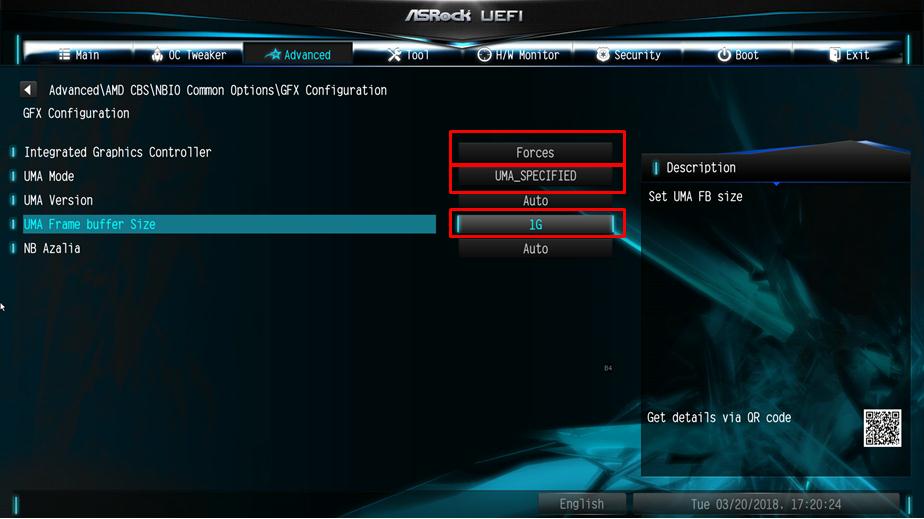
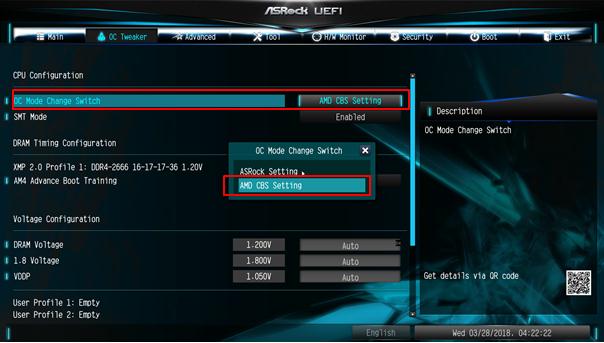
d. OC Tweaker\OC Mode Change Switch\AMD CBS Setting
3. After adjusting above options, press "F10” to save the configuration
 Menu
Menu







