Motherboards button
Moederbord Series
Graphics Card button
Grafische kaart Series
Monitors button
Monitor Gamer
Power Supply button
Power Supply
Mini PC button
Mini PC Series
AIO Liquid Coolers button
AIO Liquid Coolers
Industrial PC button
Industriële PC Series
Server/WS button
Server/Werkstation Series
Loading

We use cookies to offer you a more personalized and smoother experience.
By visiting this website, you agree to our use of cookies. If you prefer not to accept cookies or require more information, please visit our Privacy Policy.
FAQ

Als u precies weet waarover w vraag gaat dan kunt u een van deze categorieën kiezen. Categorieën:

Resultaten:
Q (Q&A-132|444): How do I turn off USB port power under S5 mode? (7/1/2017)
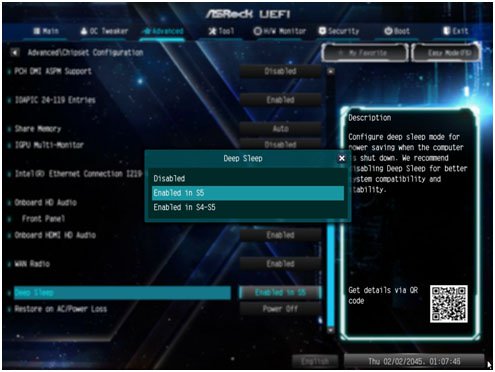
A:USB port power can be turned off by enabling "Deep Sleep” option.
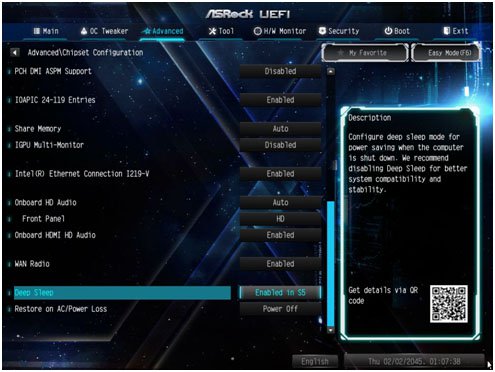
Please press "F2” or "Del” during POST to enter BIOS setup, select the "Advanced” menu and enter the "Chipset Configuration” page, and adjust the "Deep Sleep” option to "Enabled in S5”.
After adjusting the setting, press "F10” to save the configuration. Then USB port power will be turned off under S5 mode.







