A:Requirements:
O/S: Windows 10
Receiver / decoder: Onkyo TX-NR 747 or other receiver supports HDCP 2.2
Playback Software: Power DVD 14 (from Pioneer Ultra HD Blu-ray Drive)
http://www.pioneerelectronics.com/PUSA/Computer/Computer+Drives/BDR-211UBK#overview
Configuration:
M/B: Z170 Gaming-ITX/AC
BIOS: P7.10
CPU: 7th generation Intel® Core™ i7/i5 processor for Desktop PC (Kaby Lake-S)
Setup:
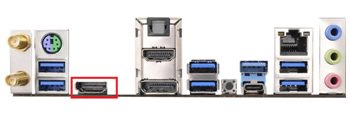
1. Please connect the HDMI cable to HDMI2 port of Z170 Gaming-ITX/ac.
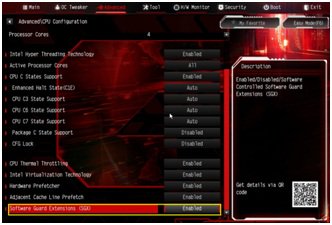
2. When the system boots up, press "F2” to enter UEFI setup screen.
Go to Advanced > CPU Configuration and enable "Software Guard Extensions” in BIOS setting.
Press "F10” to save and exit the BIOS setup screen.
3. Boot into O/S. Install all drivers for the M/B.
Install ME driver(v11.6.0.1126_SW_MSI). Download the driver from the following link:
https://www.asrock.com/MB/Intel/Fatal1ty%20Z270%20Gaming-ITXac/index.asp#osW1064
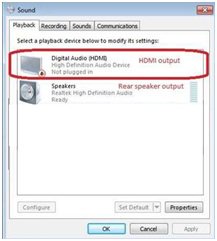
4. Please enter Control Panel > Hardware and sound > Sound.
Select "HDMI output”
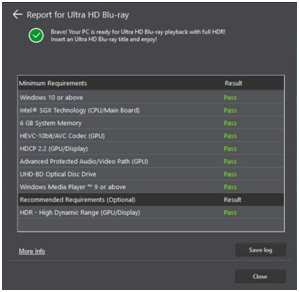
5. Enable the "UHD color” on the TV.
Please run "Ultra Blu-ray advisor” to see if all "Pass”.
Pioneer UHDBD Advisor:
http://pioneer.jp/pcperipherals/bdd/eula.php
6. Due to the fact that HDR is not supported by Intel 100 series chipset, please disable ”UHD color” from TV.
Put a 4K movie BD disc into the Pioneer Ultra HD Blu-ray drive.
7. Click " Power DVD”.
8. Then you can play the content.
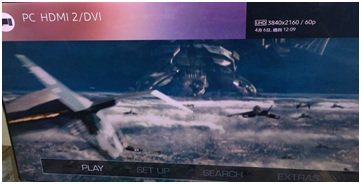
 Menu
Menu







