Motherboards button
Moederbord Series
Graphics Card button
Grafische kaart Series
Monitors button
Monitor Gamer
Power Supply button
Power Supply
Mini PC button
Mini PC Series
AIO Liquid Coolers button
AIO Liquid Coolers
Industrial PC button
Industriële PC Series
Server/WS button
Server/Werkstation Series
Loading

We use cookies to offer you a more personalized and smoother experience.
By visiting this website, you agree to our use of cookies. If you prefer not to accept cookies or require more information, please visit our Privacy Policy.

FAQ

Als u precies weet waarover w vraag gaat dan kunt u een van deze categorieën kiezen. Categorieën:

Resultaten:
Q (Q&A-55|202): ALiveNF7G-HD720P/ALiveNF7G-HDready support HDMI output?(6/25/2007)
A:Yes, ALiveNF7G-HD720P/ALiveNF7G-HDready supports HDMI output.
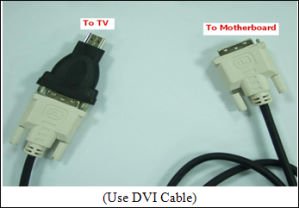
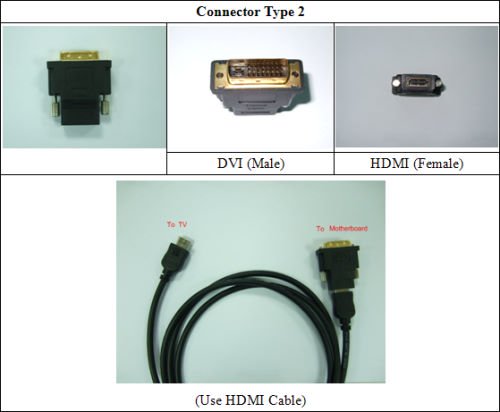
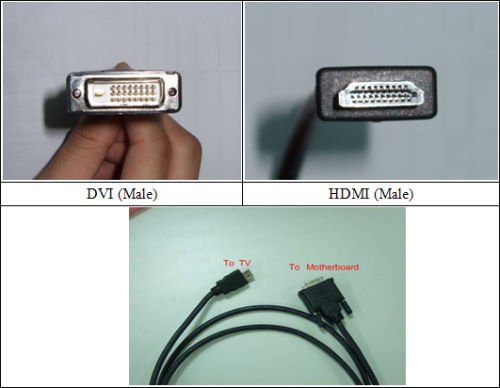
However, a DVI to HDMI cable or adapter is required.

DVI to HDMI cable

DVI to HDMI Connector
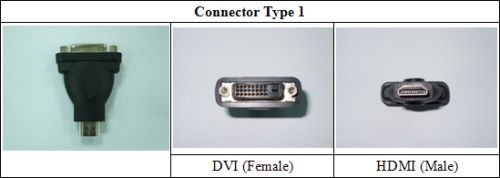


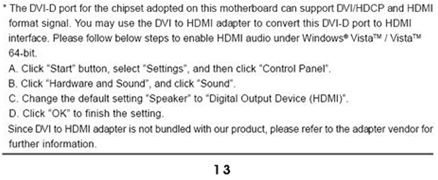
Besides the DVI to HDMI cable/adapter, please also do the following settings in BIOS SETUP and Windows® Vista™/Vista 64-bit:
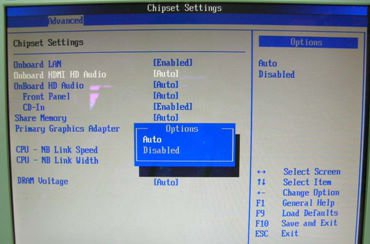
1.In BIOS SETUP, go to "Advanced"->"Chipset Configuration", and set the option "Onboard HDMI HD Audio" to [Auto].
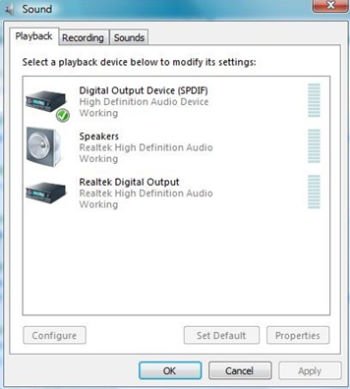
2.Under Windows® Vista™/Vista 64-bit, go to "Sound" settings and select the Digital Output Device (SPDIF) as a playback device.
You can find more detail information in user manual page 13: