Motherboards button
Alaplap
Graphics Card button
Grafikus kártya
Monitors button
Monitor Gamer
Power Supply button
Power Supply
Mini PC button
Mini PC
AIO Liquid Coolers button
AIO Liquid Coolers
Industrial PC button
Ipari PC
Server/WS button
Szerver/munkaállomás
Loading

Sütiket használunk, hogy még személyre szólóbb élményt nyújthassunk.
A weboldal meglátogatásával elfogadja a sütik használatát. Ha nem szeretné elfogadni a sütiket, vagy további tájékoztatásra van szüksége, olvassa el Adatvédelmi irányelveinket.

GYIK

Ha pontosan tudja, hogy kérdése milyen témát érint, válaszon az alábbi kategóriák közül.

Eredmények:
Q (10): If I want to use 4/6 speakers, how do I setup 4/6-Channel audio ?(11/26/2002)
A:STEP 1:
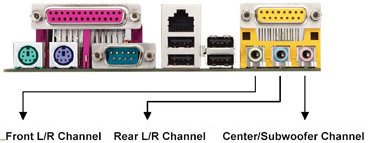
4 CH: Connect the front L/R channel to "Line Out", the rear L/R channel to "Line In".

6 CH: Connect the front L/R channel to "Line Out", the rear L/R channel to "Line In", and the Center/Subwoofer channel to "Mic In".


STEP 2:
After installation of C-Media Audio driver, you will find an icon "C-Media Audio configuration" on the taskbar.

STEP 3:
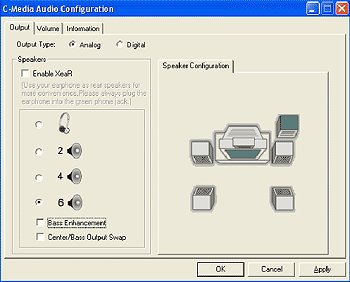
Click the icon, and the screen will show the current audio configuration.

Select "Output" to change your audio configuration. Select "Analog" for Output Type and choose "4 channels" / "6 channels" for your speaker configuration.

Then press "Apply" and press "Ok".