Question (
Q&A-39|
163):
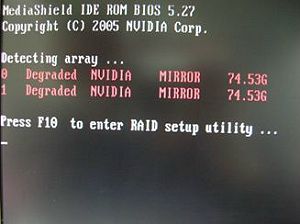
I use two SATA HDDs to create RAID 1 (mirroring) array on K8NF4G-SATA2. After I finish setting up the array and OS installation, I remove one of the two SATA HDDs. However, when I put the SATA HDD back, it shows a warning message as below when booting up the system. What should I do?
(1/16/2006)
Answer:When you remove one of the two SATA HDDs, the system will recognize the left one as an abnormal array. Then, when you put a HDD back, the system will recognize the two HDDs as two abnormal arrays. That is why it shows a warning message to remind you that is not a normal RAID 1 (mirroring) array.
In order to solve it, please press "
F10" during POST to get into MediaShield Utility and do the following steps to rebuild the array.
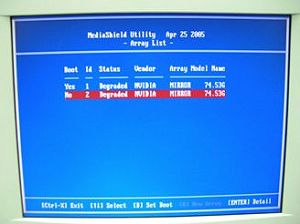
Step 1: Please go to the MediaShield Utility (Press F10) and choose one of the SATA HDD (array) in "Array list".
 Step 2
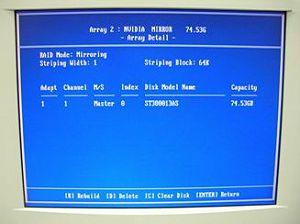
: Press "Enter" to get into the "Array Detail"
 Step 3
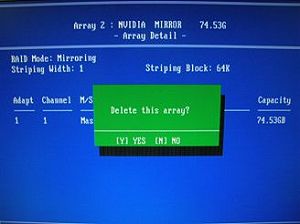
: Press "D" to delete this array.
 Step 4
: After you delete it, please go to "Array Detail" of the left Array.
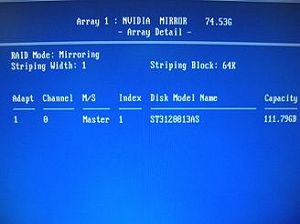 Step 5
: Press "R" (Rebuild) to get into "Select From Free Disk List"
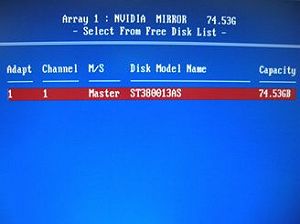 Step 6
: Press "A" then "Enter" to rebuild array.
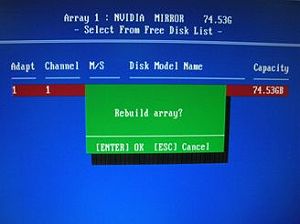 Step 7
: Finished.
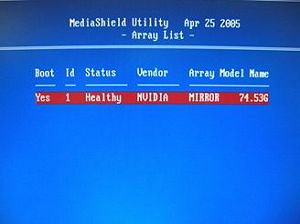 Step 8
: Press "Ctrl-X" to exit.
 Menu
Menu







