Motherboards button
Cartes Mères
Graphics Card button
Carte graphique
Monitors button
Moniteur de jeu
Power Supply button
Power Supply
Mini PC button
Mini PC
AIO Liquid Coolers button
AIO Liquid Coolers
Industrial PC button
PCs Industriels
Server/WS button
Serveurs / Stations de Travail
Loading

We use cookies to offer you a more personalized and smoother experience.
By visiting this website, you agree to our use of cookies. If you prefer not to accept cookies or require more information, please visit our Privacy Policy.

Foire Aux Questions

Si votre questions porte sur un domaine particulier, vous pouvez choisir directement une catégorie ci-contre pour les réponses aux questions les plus fréquentes:

Résultats:
Question (Q&A-22|107): The FSB jumper setting table of K7VT4A+ on the PCB silk screen on the board is different from the description in the installation guide. Which is correct?(8/16/2004)
Answer:The table on the PCB silk screen of some boards is not correct. Please refer to the FSB Jumper Setting Table in the Quick Installation Guide bundled or in the user manual in ASRock Support CD.

K7VT4A+: Support FSB 200/266/333/400 (User Guide P.13)
Jumper Setting 200MHz: FSB_SEL0 : 1_2 、FSB_SEL2 : 1_2
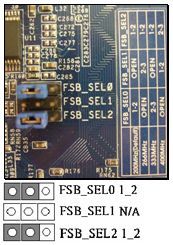
Please move the jumper cap to FSB_SEL0 : 1_2 and FSB_SEL2 : 1_2

Jumper Setting 266MHz: FSB_SEL1 : 2_3 、FSB_SEL2 : 1_2

Please move the jumper cap to FSB_SEL1 :2_3 and FSB_SEL2 : 1_2

Jumper Setting 333 MHz:FSB_SEL0 : 2_3 、FSB_SEL2 : 1_2
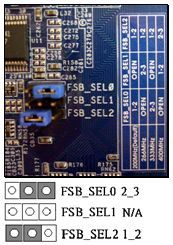
Please move the jumper cap to FSB_SEL0 : 2_3 and FSB_SEL2 : 1_2

Jumper Setting 400 MHz:FSB_SEL1 : 1_2 、FSB_SEL2 : 2_3
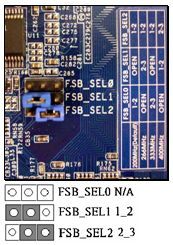
Please move the jumper cap to FSB_SEL1 : 1_2 and FSB_SEL2 : 2_3







