We use cookies to offer you a more personalized and smoother experience. By visiting this website, you agree to our use of cookies. If you prefer not to accept cookies or require more information, please visit our Privacy Policy.

Necessary cookies These cookies are essential for the proper functioning of the website and cannot be turned off.
Analytics cookies These cookies help us understand how visitors use our website.
Marketing cookies These cookies are used to track visitors and display relevant advertisements.
Social media cookies These cookies allow you to share pages and content on social media.
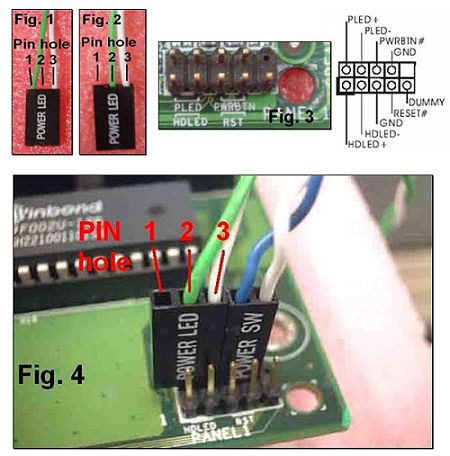
Question: When connecting the POWER SW, POWER LED, RESET SW and HDD LED cables from my chassis to the PANEL1 connector on the motherboard, I found that the pin holes of the cable does not match with the connector. What should I do?(3/15/2004) Answer: Please see the following pictures. If your POWER LED cable is designed with 2 cables in pin hole 1 and 3 (see Fig.1), please remove one of the cables and insert to the middle pin hole 2 (see Fig.2). Then, please refer to Fig.3 and Fig.4 for the connection.