We use cookies to offer you a more personalized and smoother experience. By visiting this website, you agree to our use of cookies. If you prefer not to accept cookies or require more information, please visit our Privacy Policy.

Necessary cookies These cookies are essential for the proper functioning of the website and cannot be turned off.
Analytics cookies These cookies help us understand how visitors use our website.
Marketing cookies These cookies are used to track visitors and display relevant advertisements.
Social media cookies These cookies allow you to share pages and content on social media.
Step2:
Please unzip the SATA RAID driver which downloaded in Step1 and put the SATA RAID driver in USB flash drive.
Step3:
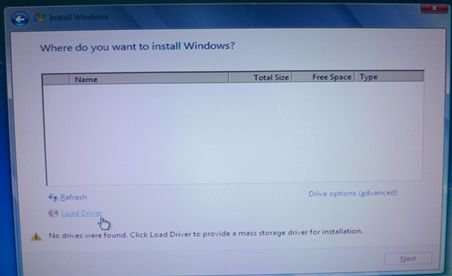
Please click "Load Driver" when selecting hard drive in Windows installation.
Step4:
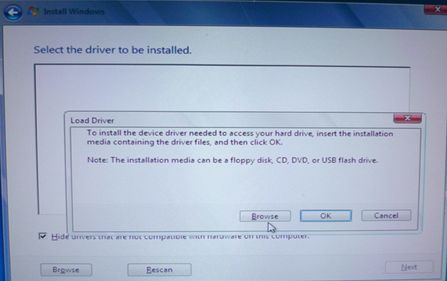
Click "Browse"
Step5:
Choose the folder downloaded in Step1.
RSTe_f6_iaStorA_2008R2_32 is used for 32-bit operating system.
RSTe_f6_iaStorA_2008R2_64 is used for 64-bit operating system
Step6:
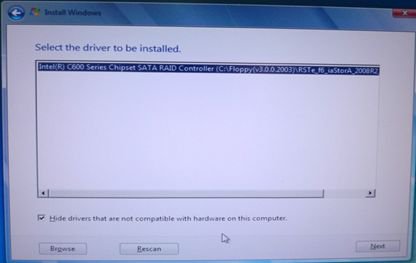
Select the SATA RAID driver for "Intel(R) C600 Series …." as below picture and click next to install the OS.