We use cookies to offer you a more personalized and smoother experience. By visiting this website, you agree to our use of cookies. If you prefer not to accept cookies or require more information, please visit our Privacy Policy.

Necessary cookies These cookies are essential for the proper functioning of the website and cannot be turned off.
Analytics cookies These cookies help us understand how visitors use our website.
Marketing cookies These cookies are used to track visitors and display relevant advertisements.
Social media cookies These cookies allow you to share pages and content on social media.
Question: I connected ALiveNF6G-DVI with DVI card to a DVI monitor. When system resumed from standby mode under Windows® Vista™, I got black screen on the monitor. How can I solve this?(12/19/2006) Answer: Please refer following steps to disable "Hybrid Sleep" under Windows® Vista™.
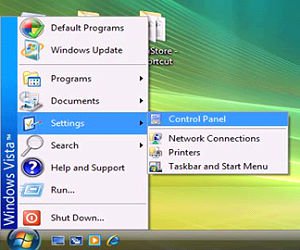
Step1: Please click "Control Panel".
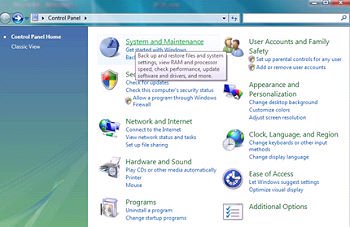
Step2: Click "System and Maintenance".
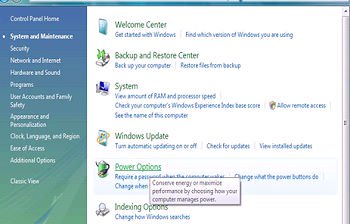
Step3: Click "Power Options"
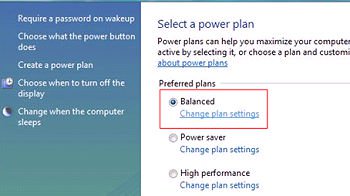
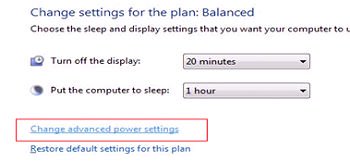
Step4: Click "Change plan settings" of "Balance"
Step5: Click "Change advanced power settings.
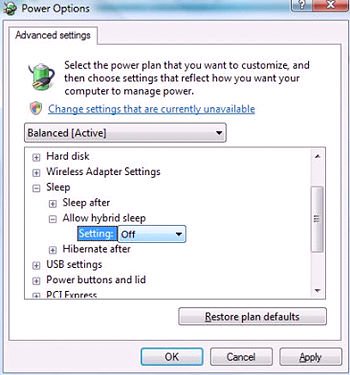
Step6: Click "sleep".
Set "Allow hybrid sleep" to off.
Step 7: Click OK or Apply to finish the setting.