We use cookies to offer you a more personalized and smoother experience. By visiting this website, you agree to our use of cookies. If you prefer not to accept cookies or require more information, please visit our Privacy Policy.

Necessary cookies These cookies are essential for the proper functioning of the website and cannot be turned off.
Analytics cookies These cookies help us understand how visitors use our website.
Marketing cookies These cookies are used to track visitors and display relevant advertisements.
Social media cookies These cookies allow you to share pages and content on social media.
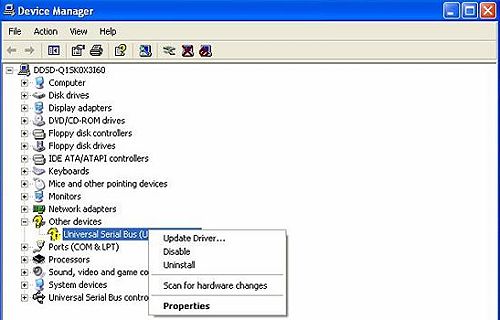
Question: My OS is Windows XP (or Windows 2000), and I have installed XP Service Pack 1 (Windows 2000 Service Pack 4). But when I use USB 2.0 devices, it will show "High-Speed devices is attached to a non-Hi-Speed port". How can I use USB 2.0 devices?(10/15/2004) Answer: Please go to "device manager" to check if the driver was installed properly. If not, please do the following steps.
1.Right click the exclamation mark device and choose properties.
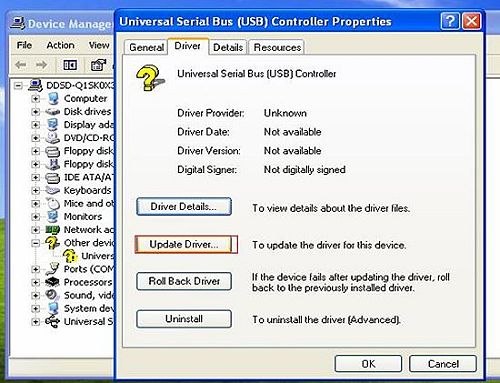
2.Click "update driver".
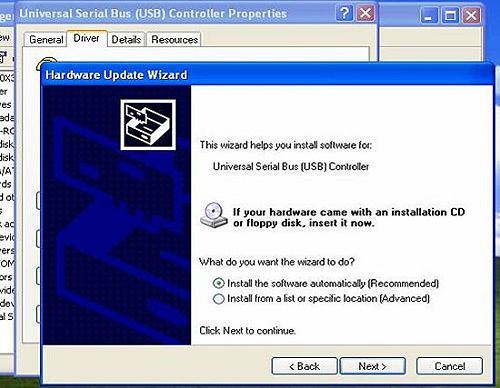
3.Choose "Install the software automatically"
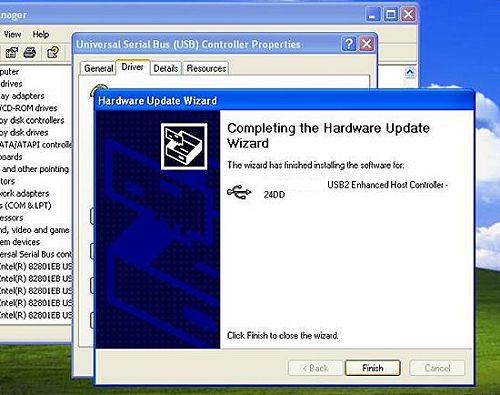
4.Then it will find the device. Please click finish.