Motherboards button
Placas-mãe
Graphics Card button
Placas de vídeo
Monitors button
Monitor Gamer
Power Supply button
Fonte de alimentação
AIO Liquid Coolers button
AIO Liquid Coolers
Industrial PC button
PC Industrial
Server/WS button
Servidores/Estações
Loading

Usamos cookies para oferecer uma experiência mais personalizada e suave.
Ao visitar este site, você concorda com o nosso uso de cookies. Se preferir não aceitar cookies ou exigir mais informações, visite nossa Política de Privacidade.
Perguntas Frequentes

Caso você saiba a categoria da sua dúvida, você pode escolher uma das categorias abaixo para perguntas frequentes. Catalogo:

Resultados:
Q (157): I installed a Windows XP operating system for 775Twins-HDTV in my SATA HDD. I want to duplicate my SATA HDD to another new SATA HDD by using GHOST program. After finished, the new duplicated SATA HDD cannot boot up. What should I do?(11/18/2005)
A:We recommend you to install Windows XP on your original SATA HDD again and install the SATA drivers at the beginning of Windows XP installation. Please refer to the following steps:
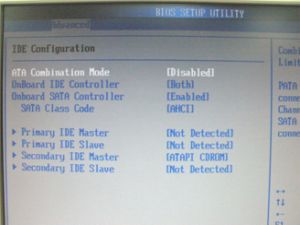
  1. Step 1: Please go to BIOS to disable the "ATA Combination Mode", or you can reserve it as default value. (BIOS/ Advanced/ IDE Configuration/ ATA Combination Mode/ Disabled)

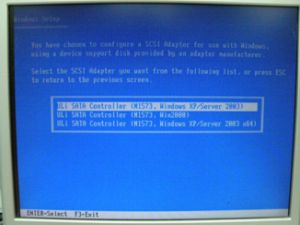
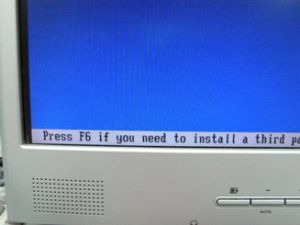
  2. Step 2: Please press "F6" to install SATA drivers at the beginning of the Windows XP installation.

  3. Step 3: Install the SATA drivers. (Please make a SATA Driver Diskette at first. Please refer to the 775Twins-HDTV user manual page 25.)

  4. Step 4: Start to install the operating system.

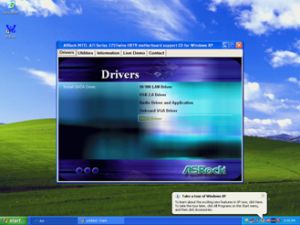
  5. Step 5: After finished the Windows XP installation, we recommend you to install the SATA driver from support CD.

  6. Step 6: Now, you can start to duplicate the HDD by using GHOST program.