We use cookies to offer you a more personalized and smoother experience. By visiting this website, you agree to our use of cookies. If you prefer not to accept cookies or require more information, please visit our Privacy Policy.
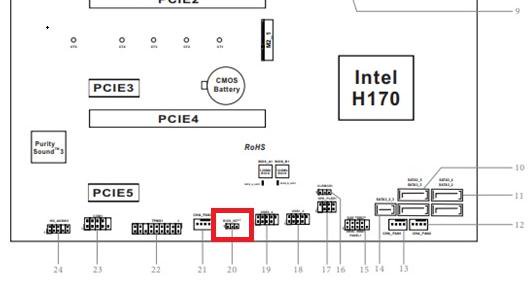
Question: How do the BIOS recovery and secure Backup UEFI functions work on the Intel H170 motherboards with two BIOS ROM chips?(6/1/2018) Answer: For Intel H170 motherboards with two BIOS ROM chips, if main BIOS (BIOS_A1) is corrupted please follow the steps below to have main BIOS recovered.
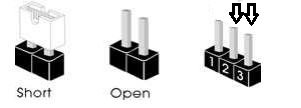
Step 1. Please unplug the power cable and move the jumper cap to short pin2 and pin3 on the "BIOS_SEL1” header.
Step 2. Please plug the power cable and boot into BIOS(BIOS_B1).
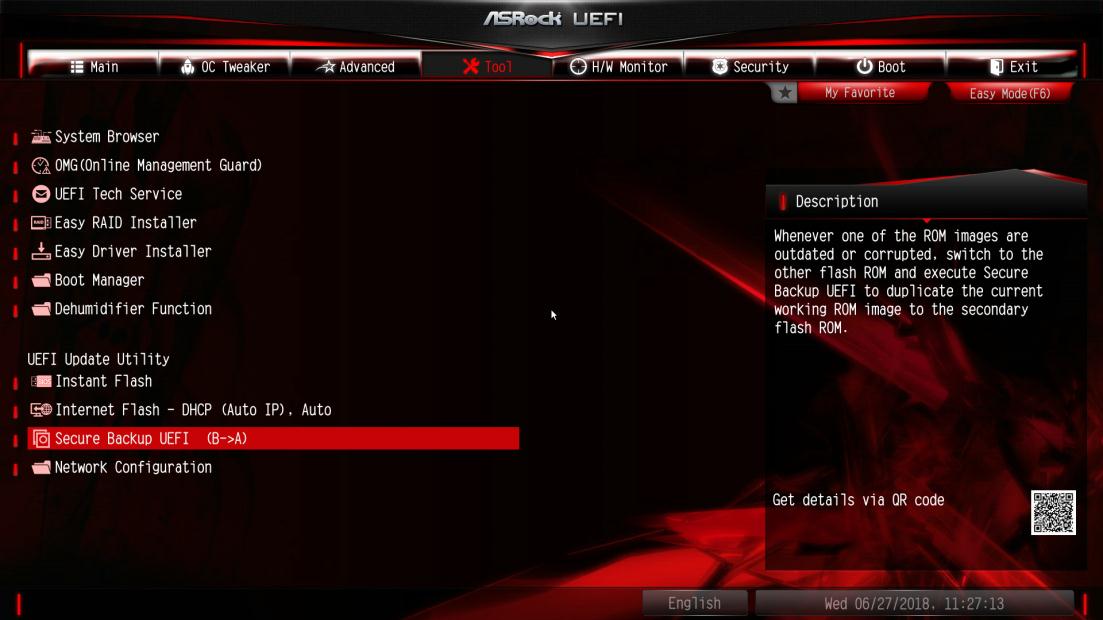
Step 3. Click Secure Backup UEFI (B->A). This will copy the backup BIOS file to the main BIOS file.
Step 4. After updating BIOS, kindly remove the power cable and move the jumper cap to short pin1 and pin2 (header BIOS_SEL1)
Step 5. Plug the power cable and the system should be boot up with main BIOS file
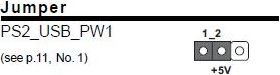
Question: After I shut down the system, my USB keyboard and mouse are still light on. How could I turn them off?(12/1/2011) Answer: If your motherboard has PS2_USB_PWR1 jumper, please adjust the PS2_USB_PWR1 header to pin 1-2(+5V), like below picture.
If not, please set [Deep SX] to [Enable] in BIOS.
Or set [On/Off Play] to [Disabled] in BIOS.
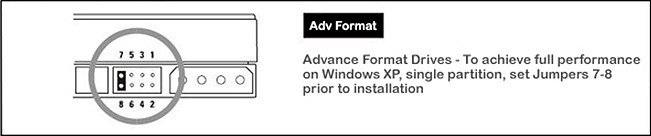
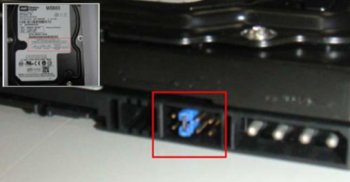
Question: I have a WD Advanced Format HDD (Western Digital) in my system. The system freezes, Windows® installation cannot find the HDD, or I have low transfer speeds. How can I solve it?(5/6/2010) Answer: Using WD Advanced Format HDD's in combination with Windows® XP may require a special jumper setting on WD Hard disk or the use of a software tool.
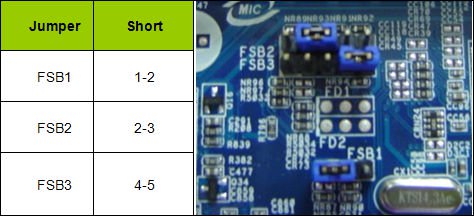
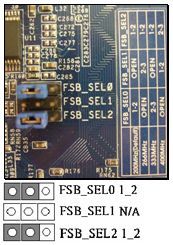
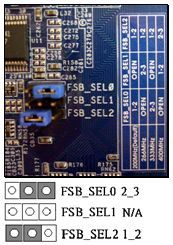
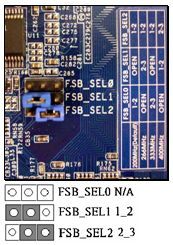
Question: My motherboard is 4Core1600Twins-P35/4Core1600P35-WiFi(+). I want to overclock my FSB 800 CPU. Are there any tips to increase the overclocking capability of my system?(1/14/2008) Answer: First of all, please update the BIOS to P1.10 or later.
(Download: https://www.asrock.com/support/download.asp?Model=P35 )
Secondly, please adjust the FSB jumper setting on the motherboard according to the following instructions (this will set the DRAM: FSB (frequency) to 1:1)
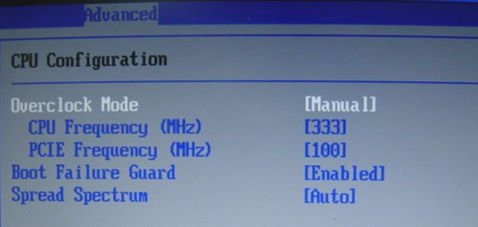
After doing the above steps, you may set the "Overclock Mode" to [Manual] in the BIOS>Advanced> CPU Configuration and then adjust the "CPU Frequency" to overclock your system.
Question: During the POST, there is a number "0075" or "0078" showed at the right corner of the screen, and the system stop for a long time. What can I do?(10/20/2006) Answer: The problem may be caused by incorrect jumper settings or bad cables of your IDE or SATA devices. Please refer to following steps to check your system. For IDE devices:
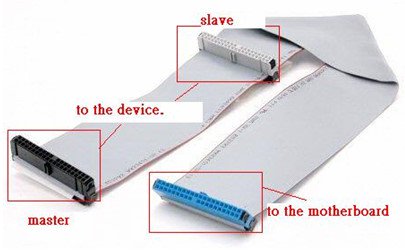
1.If you connect 2 IDE devices to 1 IDE cable, please double check the jumpers of your IDE devices if they were set correctly. The device which is connected to the black connector should be set as master, and the other should be set as slave (gray connector).
2.Please exchange the devices of master and slave on the IDE cable.
3.Please replace the IDE cable by a new one.
4.Please replace the IDE hard drive by a new one.
For SATA devices:
1.Please adjust the jumpers of your SATA2 (3.0 Gb/s) hard disk drive as SATA1 (1.5 Gb/s) mode if your motherboard supports SATA1 (1.5 Gb/s) mode only.
2.Please replace the SATA cable by a new one.
3.Please replace the SATA hard drive by a new one.
Question: I am using Geode NX CPU on ASRock K7S41 / K7S41GX / K7VT4A Pro / K7VT6-C / K7Upgrade-600 series motherboard.
How do I set FSB jumper for my CPU?(4/21/2006) Answer: The FSB of Geode NX CPU (1750,1500) is 266MHz. Please remember to adjust the FSB_SEL jumper to FSB 266MHz while using a NX CPU.
https://www.asrock.com/support/K7Jumper.pdf
Question: My SATA HD is WD 800JD. But the HDD cannot be detected by VIA 8237/8237R based motherboards. How do I solve it?(7/15/2005) Answer: Please refer the following picture to install a jumper shunt on pins 5 and 6. It will enable HDD SATA 150MB/s only operation. Then the HDD will be detected by VIA SATA motherboards.
For further detail information, please refer WD Web Site.
http://wdc.custhelp.com/cgi-bin/wdc.cfg/php/enduser/std_adp.php?p_faqid=1337&p_created=1112379341&p_sid=8iB39lKh&p_lva=&p_sp=cF9zcmNoPTEmcF9zb3J0X2J5PSZwX2dyaWRzb3J0PSZwX3Jvd19jbnQ9MTAmcF9wcm9kcz05NSZwX2NhdHM9MTgzJnBfcHY9MS45NTsyLnUwJnBfY3Y9MS4xOD
http://wdc.custhelp.com/cgi-bin/wdc.cfg/php/enduser/std_adp.php?p_faqid=1228&p_created=1090517232&p_sid=vbCxCUJh&p_lva=&p_sp=cF9zcmNoPTEmcF9zb3J0X2J5PSZwX2dyaWRzb3J0PSZwX3Jvd19jbnQ9MiZwX3Byb2RzPSZwX2NhdHM9JnBfcHY9JnBfY3Y9JnBfc2VhcmNoX3R5cGU9c2Vhcm
Question: I'm using K7VT4A+. From the specification on the website, this model supports FSB 333 MHz CPU. However, I found a FSB 400 MHz FSB jumper setting on the PCB of the motherboard. Can this motherboard support FSB 400 MHz CPU?(10/15/2004) Answer: K7VT4A+ does not support FSB 400 MHz CPU. The FSB 400 MHz jumper setting is an overclocking mode and for testing only. For system stability, it is not recommended to set the FSB jumper at FSB 400 MHz.
Question: My ASRock motherboard supports Hybrid Booster. Is Hybrid Booster a utility to install? Where can I get it?(9/14/2004) Answer: The Hybrid Booster features supported on each models are a little different.
Please go to https://www.asrock.com/mb/index.asp and find the specification of your motherboard and check the exact features supported.
Actually, Hybrid Booster is a combination of several features which have already been provided with the motherboards.
1. CPU Multiplier: Adjusted by setting onboard FID jumpers.
2. CPU Vcore adjustment: Adjusted by setting BIOS setup option.
3. CPU Frequency Stepless control: Adjusted by setting BIOS setup option.
4. AGP/PCI Frequency control: Adjusted by setting BIOS setup option.
5. ASRock U-COP: Hardware feature, no need to be adjusted.
6. Boot Failure Guard: BIOS feature, no need to be adjusted.
Please refer to https://www.asrock.com/feature/HybridBooster/HybridBooster.html for detailed explanations.
Question: The FSB jumper setting table of K7VT4A+ on the PCB silk screen on the board is different from the description in the installation guide. Which is correct?(8/16/2004) Answer: The table on the PCB silk screen of some boards is not correct. Please refer to the FSB Jumper Setting Table in the Quick Installation Guide bundled or in the user manual in ASRock Support CD.
K7VT4A+: Support FSB 200/266/333/400 (User Guide P.13) Jumper Setting 200MHz: FSB_SEL0 : 1_2 、FSB_SEL2 : 1_2
Please move the jumper cap to FSB_SEL0 : 1_2 and FSB_SEL2 : 1_2
Jumper Setting 266MHz: FSB_SEL1 : 2_3 、FSB_SEL2 : 1_2
Please move the jumper cap to FSB_SEL1 :2_3 and FSB_SEL2 : 1_2
Jumper Setting 333 MHz:FSB_SEL0 : 2_3 、FSB_SEL2 : 1_2
Please move the jumper cap to FSB_SEL0 : 2_3 and FSB_SEL2 : 1_2
Jumper Setting 400 MHz:FSB_SEL1 : 1_2 、FSB_SEL2 : 2_3
Please move the jumper cap to FSB_SEL1 : 1_2 and FSB_SEL2 : 2_3
Question: My motherboard is K7S8X. When I connect my HDD on primary IDE with jumper setting at master and AOpen DVD\CD-RW combo drive on primary IDE with jumper setting at slave, it takes more than 1 minute to login Windows XP. How can I solve this problem?(7/12/2004) Answer: To solve this issue, please connect the HDD on primary IDE with jumper setting at master and AOpen DVD\CD-RW combo drive on secondary IDE with jumper setting at master. Or you can update the motherboard's BIOS to version 2.40 or later to solve this https://www.asrock.com/mb/download.asp?Model=K7S8X#bios
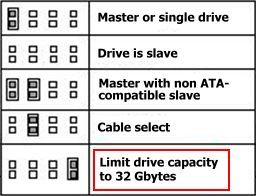
Question: I bought a new large size (80GB) HDD. After I installed it to my ASRock M/B, the BIOS only recognized it as a 32GB HDD. How can I get the full capacity of the HDD?(4/15/2004) Answer: Please understand that most HDDs provide a jumper setting that will limit the maximum capacity, such as 32GB or 2GB. Please kindly double check the jumper setting of your HDD, and adjust the jumper setting to the correct position instead of the "Limit drive capacity" position.
Question: I'm using Duron 1600MHz Applebred CPU on your K7 series motherboard. How come the CPU is only recognized as a Duron 1200MHz CPU?(11/14/2003) Answer: The FSB of Duron Applebred CPU (1400MHz to 1800MHz) is 266MHz. It is different from the former Duron CPU (FSB 200MHz). Please remember to adjust the FSB_SEL jumper to FSB 266MHz while using a Duron Applebred CPU.
https://www.asrock.com/support/K7Jumper.pdf
Question: After I shut down the system, my USB mouse is still light on. Why?(8/15/2003) Answer: In order to solve this problem, please adjust the PS2_USB_PWR1 jumper to pin 1-2(+5V).
Question: My motherboard provides FID jumpers. Why I can't change my CPU multiplier even though I already adjust FID jumpers correctly?(8/15/2003) Answer: If the multiplier of your CPU is locked by itself, you can't change it even though you set FID jumpers through the motherboard.
Question: I'm using P4i45PE now. How do I run FSB 800 MHz correctly?(7/9/2003) Answer: 1.Please use Intel® FSB 800 MHz CPU for your system.
2. Please set FSB jumper in pin 2-3 (Test)
3. Please install one DDR400(PC3200) in slot 1.
DDR SDRAM requires CL=2.5 or CL=2.
Please also refer to P4i45PE memory support list.
https://www.asrock.com/mb/memory/P4i45PE.pdf
Question: How to clear CMOS? (6/13/2003) Answer: Please unplug the ATX power and remove the battery, use a metal material like paper clip to short the CLRCMOS1 soldering points or CLRCMOS2 jumpers for 3 seconds. After that, install the battery and plug the ATX power back to the motherboard.
Note: Please do not clear the CMOS right after you update the BIOS.
Question: What's the function of JL1 and JR1 jumpers on my ASRock motherboard?(5/9/2003) Answer: When you connect speakers in back panel and front panel at the same time,
1. If the jumpers JL1 and JR1 are short, both front panel and rear panel audio connectors can work.
2. If both jumper caps on JL1 and JR1 are removed, only front panel audio works.
However, it requires your front panel to support the function.
Question: How can I run a FSB800 CPU on P4i45G correctly?(5/9/2003) Answer: The requirement for P4i45GL to run with a FSB800 CPU is as following:
1. Adjust the FSB jumper from 1-2 pin (normal) to 2-3 pin (test). The jumper is near the CPU fan connector.
2. Memory requires DDR333 SDRAM
Please make sure that the jumper setting is correct and the memory is DDR333.
Question: I'm using a AMD Athlon XP 2000+ processor with FSB 266MHz on K7S8X, but the FSB jumper can only set from 100, 133, 166MHz. How do I adjust to FSB 266MHz?(4/15/2003) Answer: Please understand that AMD Athlon XP 2000+ processor with FSB 266MHz is actually running with 133*2=266MHz. Please adjust the FSB jumper to 100MHz for FSB 200MHz processors, 133MHz for FSB 266MHz processors and 166MHz for 333MHz processors.
Question: How can I set CPU FSB (Front Side Bus) correctly?(1/30/2003) Answer: For Intel CPU: You do not need to do any setting. When you install CPU at the first time, all that you need to do is go to BIOS and "Load setup defaults", then the system will auto detect the correct CPU FSB.
For K7VT2 and K7VM2: There is a FSB_SEL jumper on the motherboard .
FSB 100Mhz set 2-3
FSB 133Mhz set 1-2
Question: Why can't I boot up my system with one hard drive on primary IDE and an optical device (CD-ROM, DVD-ROM, CD-RW, etc...) on secondary IDE If connecting the hard drive/optical device as the secondary drive?(10/29/2002) Answer: For best compatibility and stability, please make sure your stand alone hard drive on primary IDE has jumper setting to master, and your stand alone optical device on secondary IDE has jumper setting to master, too. Also if you only have one hard drive without any other optical device, please connect the hard drive to primary IDE with its jumper setting to master. Furthermore, for optimizing the transfer rate for the hard drive, we recommend you to connect your hard drive(s) to the primary IDE channel and optical device(s) to the secondary IDE channel.