We use cookies to offer you a more personalized and smoother experience. By visiting this website, you agree to our use of cookies. If you prefer not to accept cookies or require more information, please visit our Privacy Policy.

Question: My PC runs Windows 98/ME, can I still use USB 2.0 products?(11/26/2002) Answer: Since Microsoft is only developing drivers for Windows XP and 2000, you will have to use a 3rd party vendor's drivers. Also Power Management for USB 2.0 works fine under Windows XP. It may not work properly under Win98/ME/2000. Please check detailed information from Microsoft Web Site:
Question: How do I install USB 2.0 driver under Windows XP for K7VT2?(11/26/2002) Answer: Please install the USB 2.0 driver by running the support CD.
Click the icon of "VIA USB 2.0 Driver" in the support CD main menu.
Question: Do I need to install USB2.0 driver if my system runs Win XP SP1?(3/3/2003) Answer: You don’t need to install USB2.0 if you already upgrade to service pack 1 which
include USB2.0 driver.
Question: Does ASRock motherboard support "Boot from USB device", if my USB device is bootable?(4/15/2003) Answer: Yes! All of ASRock motherboards support "Boot from USB device".
When the system boot up, please press "F8" or "F11" to enter "Boot Menu" and select USB device for your fist boot device , then the system will boot from the USB device which you selected. For P4I45D, please plug the bootable USB device to USB port 2,3.
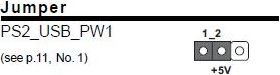
Question: After I shut down the system, my USB mouse is still light on. Why?(8/15/2003) Answer: In order to solve this problem, please adjust the PS2_USB_PWR1 jumper to pin 1-2(+5V).
Question: My motherboard is SiS chipset based K7S8XE, why my USB 2.0 hard disk box can not be recognized under Windows XP?(11/14/2003) Answer: We have experienced that some USB 2.0 boxes may not conscientiously follow the USB 2.0 specification to design, so it cannot operate properly with USB 2.0 specification. Please update the newest BIOS, and then disable the USB 2.0 controller in the BIOS SETUP. At this moment, the USB 2.0 box may have chance to operate with USB 1.1 specification.
Question: In the beginning of P4VT8 SATA driver diskette creating process, my USB keyboard seems doesn't work. What should I do?(11/14/2003) Answer: In order to fix this problem, please go to BIOS SETUP -> Advanced menu -> Chipset Configuration -> USB Device Legacy Support and set it to "Enable". For best system stability, please set it back to "Disable" after the SATA driver diskette creating process.
Question: My motherboard is K7S8XE, what is the function of USB 2.0 controller option in the BIOS setup?(2/17/2004) Answer: If USB 2.0 controller is disabled, the USB controller will be 1.1 only. We realized that some USB devices, especially external USB box of hard disk drive, are over the USB 2.0 specification and it may not be recognized in the Windows OS. Under this situation, please disable the USB 2.0 controller.
Question: When my computer is in standby mode, I can not resume from USB devices. Can you help?(1/16/2007) Answer: This is due to the design of Windows® XP system. You may refer to the Microsoft® Knowledge Base:
http://support.microsoft.com/kb/841858
If you want to resume from USB devices, such as USB mouse, remote control, you may directly install the registry file below:
https://www.asrock.com/support/download/ResumeUSB.ZIP and then restart your computer.
Question: I use an external USB HDD on ALiveNF7G-HD720P/ALiveNF7G-HDready. I feel that the speed of USB is slower. Is there any method to improve it?(6/25/2007) Answer: Please kindly refer to below steps for try.
1.Open Notepad and type following registry entry.
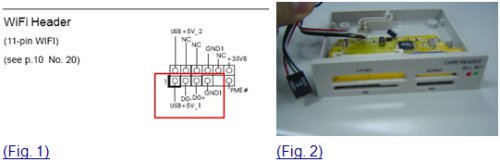
Question: My motherboard is Wolfdale1333-D667 R1.0/R2.0. I want to install one more internal USB device, is there any way I can do?(2/14/2008) Answer: Actually, the WiFi connector (Fig.1) can connect one more internal USB device.
You may install an additional internal USB device that with 4 pin connector on this motherboard.
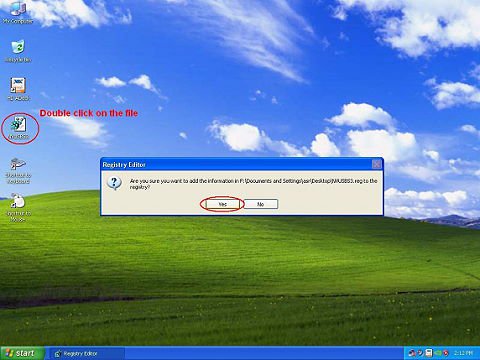
For example: A USB card reader with 4 pin connector. (Fig. 2)
Question: With ION330, Under Windows® XP, I can not wake up system from S3 and S4 by USB keyboard mouse, why?(8/11/2009) Answer: Please refer to the steps as below to solve the issue.
1.Please download a registry from the link as below,
https://download.asrock.com/Drivers/others/NVUSBS3.zip
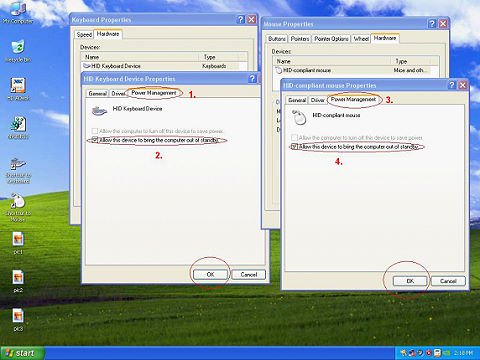
2.Referring to the picture, please double click on the file NVUSBS3, and click YES.
After the registry is complete, a window may shows up, please press OK and RESTART your computer.
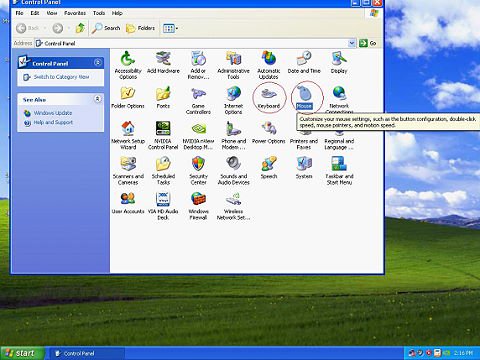
3.Referring to the picture, double click on Keyboard and Mouse in START -> Control Panel.
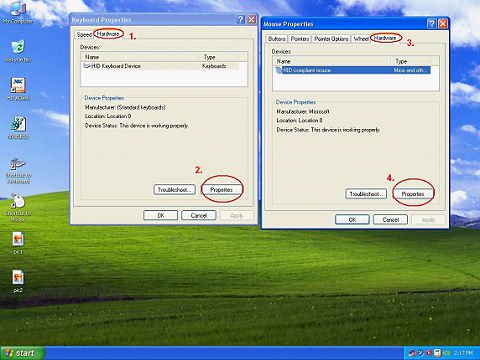
4.Referring to the picture, move to Hardware tags as 1. and 3., click on Properties as 2. and 4.
5.Referring to the picture, move to Power Management tag as 1. and 3.
Check Allow this device to bring the computer out of standby in BOTH Keyboard and Mouse windows, as 2. and 4.
6.Now it's available for you to bring your computer from S3 and S4 with your USB keyboard and mouse.
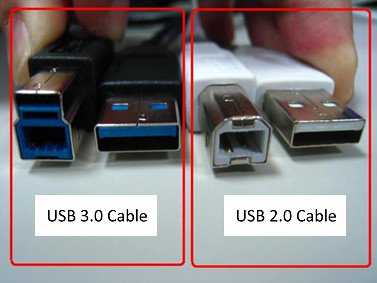
Question: Could I connect USB2.0 cable to USB3.0 external HDD device and USB3.0 external HDD device run at SuperSpeed mode?(5/6/2010) Answer: USB3.0 and USB2.0 cable has some differences, please refer below picture to check your USB cable is USB2.0 or USB3.0
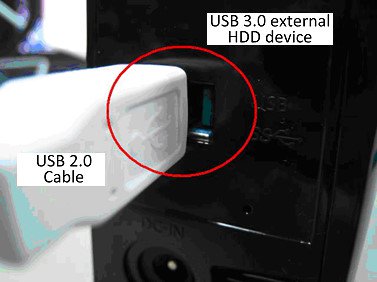
If you connect USB2.0 cable on USB3.0 external HDD device like below, it will not run at SuperSpeed mode.
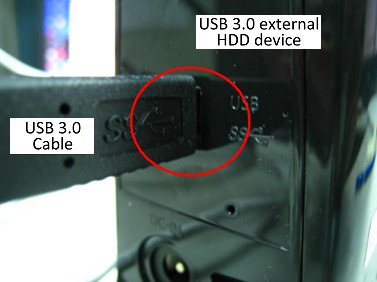
Please connect USB3.0 cable on USB3.0 external HDD device to run at SuperSpeed mode.
Question: Why can't my iPhone4 be recognized by Etron USB3.0 controller?(3/14/2011) Answer: Please download Etron USB3.0 driver version 0.96 and update it for your system.
Etron USB3.0 driver ver.0.96 download link as below. https://www.asrock.com/support/download.asp
Question: I would like to use WD SmartWare software for system backup, but when ASRock Xfast USB is enabled, WD Smartware does not work. What can I do?(9/1/2011) Answer: Please uninstall original Asrock XFast from your system, and update latest XFast from below link: https://www.asrock.com/feature/XFastUSB/index.asp
Question: Etron USB3.0 ports could not detect my USB3.0 devices with JMicron IC, what should I do?(9/1/2011) Answer: Please follow the steps below,,
1. Please update your Etron USB3.0 driver v0.104 from the link below, https://download.asrock.com/Drivers/others/Etron(0.104.WHQL).zip
2. Please contact JMicron and ask them to help you with firmware update.
You could contact JMicron with information below,
Email: fae@jmicron.com
Please kindly inform JMicron the driver version (v0.104) you are using for their reference.
Question: After I shut down the system, my USB keyboard and mouse are still light on. How could I turn them off?(12/1/2011) Answer: If your motherboard has PS2_USB_PWR1 jumper, please adjust the PS2_USB_PWR1 header to pin 1-2(+5V), like below picture.
If not, please set [Deep SX] to [Enable] in BIOS.
Or set [On/Off Play] to [Disabled] in BIOS.
Question: I can not copy the file successfully when using XFast USB under Windows XP. How could I do?(3/1/2012) Answer: Please download and install XFast USB v3.02.30 from below link: https://www.asrock.com/feature/XFast/XFastUSB/
Question: I cannot copy files via ASMedia USB3.0 ports when using XFast USB under Windows 8. How do I solve this problem?(3/1/2013) Answer: If you want to use XFast USB on ASMedia USB3.0 port, please uninstall ASMedia USB3.0 driver and use Windwos 8 inbox driver.
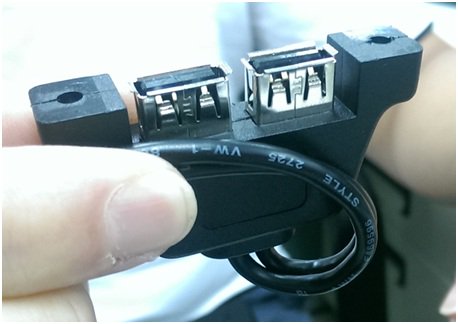
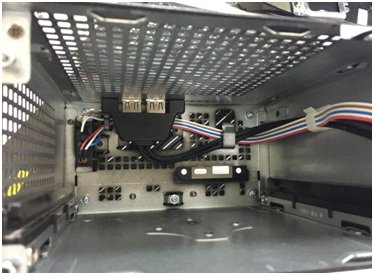
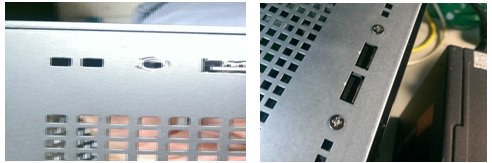
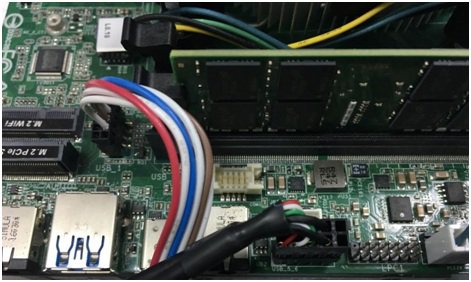
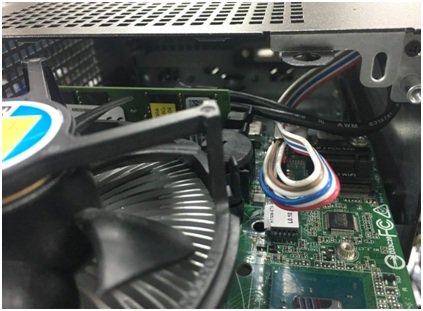
Question: I want to add USB 2.0 front panel for DeskMini, how do I install the USB 2.0 front panel ?(12/1/2016) Answer: If you would like to install the USB2.0 front panel on the Deskmini, please refer the following steps to install it.
Step 1. Before installing the USB2.0 front panel into the chassis.
Please refer the following picture to setup the USB2.0 front panel cable.
Step 2. Put the USB2.0 front panel into the chassis as following picture.
Step 3. Screw the USB2.0 front panel on the chassis as following pictures.
Step 4. Install the USB2.0 connector to USB2.0 header.
Step 5. Insert the motherboard into the chassis.
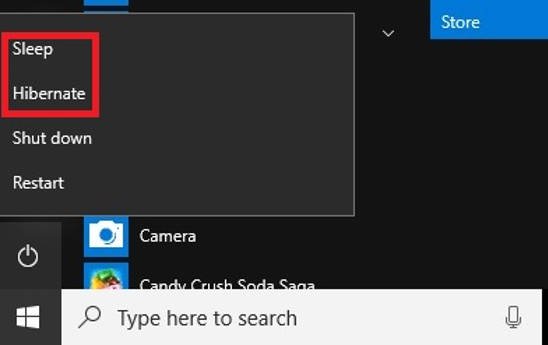
Question: I want to use USB Power On function on AM4 series boards, how do I set up?(6/1/2017) Answer: The USB power on function supports under Sleep (S3) and Hibernate (S4) modes under Windows OS.
Please click the Start menu button and then choose Sleep (S3 mode) and Hibernate (S4 mode) under Windows.
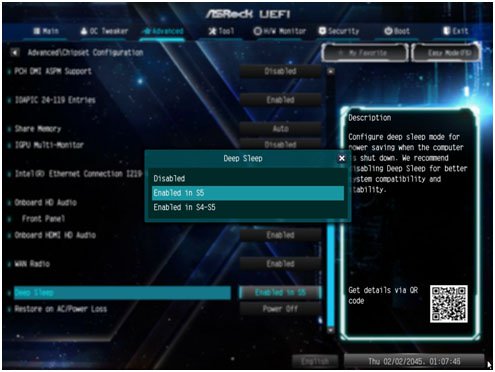
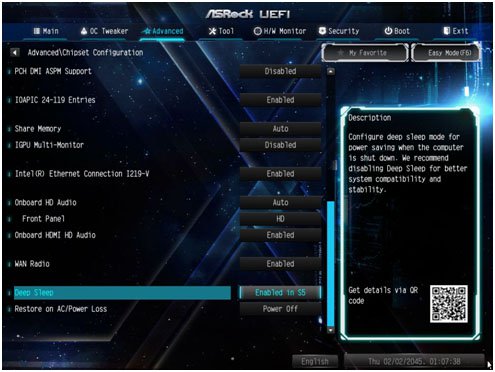
Question: How do I turn off USB port power under S5 mode? (7/1/2017) Answer: USB port power can be turned off by enabling "Deep Sleep” option.
Please press "F2” or "Del” during POST to enter BIOS setup, select the "Advanced” menu and enter the "Chipset Configuration” page, and adjust the "Deep Sleep” option to "Enabled in S5”.
After adjusting the setting, press "F10” to save the configuration. Then USB port power will be turned off under S5 mode.
Question: Why does the USB4 Virtual Power Coordination Device show a question mark?(10/29/2024) Answer: When expanding "Other devices" in device manager, entries for the "USB4 Virtual Power Coordination Device" may appear. These devices are native to Windows 11 and serve as virtual handlers for USB4/Thunderbolt 4 ports. This behavior is considered normal.